Memory Usage Calculator
PerformanceEstimate the total RAM required for any dataset or in-memory data structure. Accounts for per-item size, runtime overhead, and replica count.
Last updated: April 2026
This calculator is designed for real-world usage based on typical engineering scenarios and publicly available documentation.
A memory usage calculator helps engineers size in-memory caches, databases, and application heaps before provisioning infrastructure. Whether you're loading millions of records into Redis, sizing a JVM heap, or planning a distributed cache across three replicas, the formula is the same: items × bytes per item × overhead factor × replicas. Runtime overhead is the most commonly forgotten variable. A Java object carries a 16-byte header before any fields; a Go struct may be padded for alignment; a Redis key adds metadata beyond the raw string length. Typical values range from 10–25% for native runtimes to 50–100% for managed runtimes with GC pressure. This calculator is useful for backend engineers capacity-planning a new service, SREs estimating node memory requirements, and architects deciding between in-process and out-of-process caches. Plug in your numbers, adjust the overhead slider until it matches your profiler output, then multiply by your replication factor to get the true cluster footprint.
How to Calculate Memory Usage
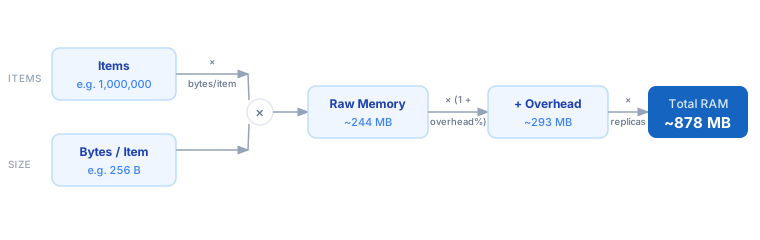
1. Count the number of items you need to hold in memory — rows, objects, cache entries, or events. 2. Measure or estimate the size of one item in bytes. Use a profiler, sizeof(), or a byte-counting tool for accuracy. 3. Set the overhead percentage to account for runtime metadata: object headers, GC bookkeeping, memory alignment padding, and hash-table load factors. 4. Enter the number of replicas if the data will be held in multiple nodes or processes simultaneously. 5. The calculator multiplies: Items × Bytes/Item × (1 + Overhead%) × Replicas to give total RAM.
Formula
Total Memory = Items × Bytes per Item × (1 + Overhead / 100) × Replicas

Items          — number of objects, rows, or cache entries
Bytes per Item — raw serialised size of one item in bytes
Overhead %     — runtime tax: GC metadata, object headers, alignment padding
                 (typical: 15–25% Go/Rust, 20–50% JVM, 30–100% scripting runtimes)
Replicas       — copies held simultaneously (e.g. 3 for a 3-node Redis cluster)
Example Memory Usage Calculations
Example 1 — Redis cache: 5 M session objects
Items:       5,000,000
Bytes/item:  512 bytes  (session token + metadata)
Overhead:    30%        (Redis per-key overhead ~100–200 B absorbed here)
Replicas:    3

Raw:         5,000,000 × 512 B          =   2,441 MB  (~2.4 GB)
With overhead: 2,441 MB × 1.30          =   3,173 MB  (~3.1 GB per node)
Total cluster: 3,173 MB × 3             =   9,519 MB  (~9.3 GB)
Example 2 — JVM heap: 10 M domain objects
Items:       10,000,000
Bytes/item:  128 bytes  (16-byte header + ~7 fields × ~16 bytes avg)
Overhead:    40%        (GC bookkeeping, compressed oops, fragmentation)
Replicas:    1

Raw:         10,000,000 × 128 B         =   1,221 MB  (~1.2 GB)
With overhead: 1,221 MB × 1.40          =   1,709 MB  (~1.7 GB)
→ Set -Xmx to at least 2 GB with headroom for GC spikes.
Example 3 — In-process Go cache: 1 M structs
Items:       1,000,000
Bytes/item:  64 bytes   (4 × int64 + 1 × string header)
Overhead:    15%        (map bucket overhead, alignment padding)
Replicas:    2          (two app pods each holding full dataset)

Raw:         1,000,000 × 64 B           =     61 MB
With overhead: 61 MB × 1.15             =     70 MB per pod
Total:         70 MB × 2               =    140 MB across fleet
Tips to Reduce Memory Usage
- › Profile before estimating. Use a heap dump (JVM), pprof (Go), or <code>valgrind --tool=massif</code> (C/C++) to get the actual bytes-per-object, not a theoretical struct size.
- › Choose compact types. Replacing a <code>string</code> UUID with a 16-byte <code>[]byte</code> UUID cuts 40+ bytes of header overhead per object in most runtimes.
- › Set cache eviction policies. LRU or TTL-based eviction bounds memory growth. Without it, in-memory caches grow until the process is OOM-killed.
- › Pool objects when possible. Object pools (sync.Pool in Go, commons-pool in Java) reuse allocations and cut GC overhead from 30–50% down to under 10%.
- › Use columnar layouts for large datasets. Column-oriented storage (Apache Arrow, DuckDB) compresses repeated values and halves memory versus row-oriented records.
- › Benchmark your replica overhead separately. If your replicas share a read-only memory-mapped file, actual RAM usage may be much lower than the naive Items × Replicas estimate.
Notes
- › Results are estimates and may vary based on actual usage.
- › Always validate against your production environment.
Frequently Asked Questions
How do I find the exact size of an object in my language? +
unsafe.Sizeof() or the pprof heap profile. In Java, use Java Object Layout (JOL) or a heap dump analyzed with Eclipse MAT. In Python, use sys.getsizeof() but note it only measures the top-level object. In C/C++ use sizeof(). For Redis, run OBJECT ENCODING key and OBJECT IDLETIME key alongside DEBUG OBJECT key. What overhead percentage should I use for the JVM? +
How much overhead does Redis add per key? +
MEMORY USAGE key on Redis 4+ to measure actual consumption for a specific key.