Kubernetes Resource Calculator
GeneralEnter your replica count, CPU requests, and memory requests to instantly see total cluster resource consumption. Includes CPU and memory limits so you can right-size nodes before deploying.
Last updated: April 2026
This calculator is designed for real-world usage based on typical engineering scenarios and publicly available documentation.
The Kubernetes resource calculator helps platform engineers and DevOps teams plan cluster capacity before rolling out workloads. Kubernetes schedules pods based on resource requests — the guaranteed CPU and memory each container needs — and enforces hard caps via resource limits. Getting these numbers wrong leads to OOMKilled pods, CPU throttling, or nodes that can never be fully packed. This calculator multiplies per-pod resource requests and limits by the number of replicas to give you the total footprint of a deployment. Use it when sizing a new node pool, estimating the cost of scaling a service horizontally, or auditing whether your current requests match actual consumption. For services that scale dynamically via a Horizontal Pod Autoscaler (HPA), run the calculator at both your minimum and maximum replica counts to bracket the range. The difference tells you how much headroom your nodes need to absorb a surge without evicting lower-priority workloads. The formulas here apply equally to Deployments, StatefulSets, DaemonSets (where replicas equals your node count), and ReplicaSets. All units follow the Kubernetes convention: CPU in millicores (1 core = 1000m) and memory in mebibytes (1 GiB = 1024 MiB).
How the Kubernetes Resource Calculator Works
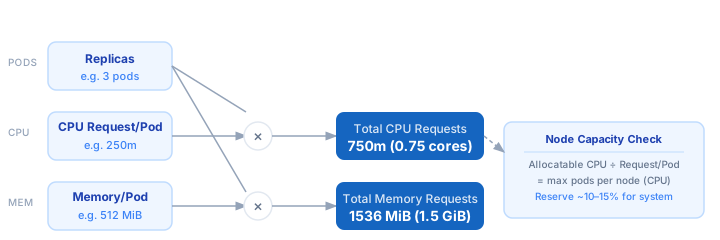
1. Set your replica count — the number of pods Kubernetes will schedule for the Deployment or StatefulSet. 2. Enter the CPU request per pod in millicores (e.g. 250m = 0.25 cores). This is what Kubernetes uses to place the pod on a node. 3. Enter the memory request per pod in MiB (e.g. 512 MiB). Kubernetes guarantees this RAM is available before scheduling. 4. Optionally enter CPU and memory limits — the hard caps beyond which the container is throttled (CPU) or killed (memory). 5. The calculator multiplies each value by the replica count and converts to human-readable units (cores / GiB) when the totals are large enough.
Formula
Total CPU Requests  = Replicas × CPU Request per Pod (millicores)
Total Memory Requests = Replicas × Memory Request per Pod (MiB)
Total CPU Limits    = Replicas × CPU Limit per Pod (millicores)
Total Memory Limits = Replicas × Memory Limit per Pod (MiB)

Replicas            — number of pods scheduled by the controller
CPU Request per Pod — guaranteed CPU in millicores (1 core = 1000m)
Memory Request/Pod  — guaranteed RAM in MiB (1 GiB = 1024 MiB)
CPU Limit           — hard throttle ceiling per pod (millicores)
Memory Limit        — hard kill ceiling per pod (MiB)
Example Kubernetes Resource Calculations
Example 1 — Small web API (3 replicas)
CPU Request: 250m per pod  ×  3 replicas  =  750m  (0.75 cores)
CPU Limit:   500m per pod  ×  3 replicas  =  1500m (1.50 cores)
Memory Req:  512 MiB/pod   ×  3 replicas  =  1536 MiB (1.50 GiB)
Memory Limit: 1024 MiB/pod ×  3 replicas  =  3072 MiB (3.00 GiB)

→ A 4-core / 8 GiB node can fit 5 replicas before requests fill the node.
Example 2 — Java microservice scaled to 10 replicas
CPU Request: 500m per pod  × 10 replicas  =  5000m (5.00 cores)
CPU Limit:  1000m per pod  × 10 replicas  = 10000m (10.00 cores)
Memory Req: 2048 MiB/pod   × 10 replicas  = 20480 MiB (20.00 GiB)
Memory Limit: 4096 MiB/pod × 10 replicas  = 40960 MiB (40.00 GiB)

→ Plan at least 3 × 8-core nodes to satisfy requests with headroom for the OS.
Example 3 — DaemonSet on a 20-node cluster
Replicas = 20 (one pod per node, set replicas = node count)
CPU Request: 100m per pod  × 20 nodes  =  2000m (2.00 cores)
Memory Req:  128 MiB/pod   × 20 nodes  =  2560 MiB (2.50 GiB)

→ Each node reserves 100m CPU and 128 MiB just for the DaemonSet agent before any workload pods are scheduled.
Tips for Right-Sizing Kubernetes Resources
- › Start with VPA (Vertical Pod Autoscaler) in recommendation mode — it watches actual CPU and memory usage and suggests right-sized requests without changing anything, so you have real data to plug into this calculator.
- › Never set CPU requests to 0. Kubernetes will schedule the pod on any node and it will compete unrestricted with other workloads, causing unpredictable latency spikes under load.
- › Set memory requests equal to memory limits for critical services. This gives the pod a Guaranteed QoS class — Kubernetes evicts BestEffort and Burstable pods first under node memory pressure.
- › For JVM workloads, set -XX:MaxRAMPercentage=75 and make your memory limit ~33% higher than the JVM heap to leave room for off-heap allocations and avoid OOMKill surprises.
- › Use Limit Ranges at the namespace level to enforce minimum and maximum resource values so misconfigured pods never land on a node without sensible bounds.
- › When planning node pool size, account for ~10–15% of node capacity consumed by Kubernetes system components (kubelet, kube-proxy, CNI). A 4-core node effectively has ~3.5 cores available for workloads.
Notes
- › Results are estimates and may vary based on actual usage.
- › Always validate against your production environment.