Pod Capacity Calculator
GeneralEnter your node size and pod resource requests to instantly see how many pods fit — and which resource is your scheduling bottleneck.
Last updated: April 2026
This calculator is designed for real-world usage based on typical engineering scenarios and publicly available documentation.
The pod capacity calculator tells you exactly how many Kubernetes pods can be scheduled onto a single node given its CPU and memory. Kubernetes uses resource requests — not limits — for scheduling decisions, so a node with 4 cores can only fit pods whose CPU requests sum to ≤4 cores, regardless of actual utilisation. Platform engineers use this calculation when sizing node pools, choosing instance types, or debugging why pods are stuck in Pending state. The answer is always a min() of two independent constraints: how many pods fit by CPU and how many fit by memory. Whichever number is smaller is your bottleneck. Note that Kubernetes reserves some capacity for system components (kubelet, kube-proxy, OS daemons). For production clusters, subtract roughly 100–300 millicores and 512–1024 MiB from the raw node capacity before entering values above. Allocatable capacity can be checked with <code>kubectl describe node</code> under the Allocatable section. This calculator is intentionally simple: it models a single node with uniform pods. For mixed workloads, repeat the calculation per pod type and sum across your node pool.
How to Calculate Pod Capacity per Node
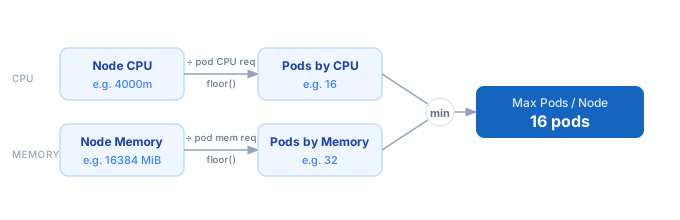
1. Find your node's allocatable CPU and memory — use `kubectl describe node` and read the Allocatable section, not Capacity. 2. Note your pod's CPU request in millicores (e.g. 250m = 0.25 cores) and memory request in MiB. 3. Divide allocatable CPU (in millicores) by pod CPU request. Take the floor. This is the max pods by CPU. 4. Divide allocatable memory (in MiB) by pod memory request. Take the floor. This is the max pods by memory. 5. The actual max pods is the minimum of the two. The resource that produces the smaller number is your scheduling bottleneck.
Formula
Pods by CPU    = floor(Node CPU (millicores) ÷ Pod CPU Request (millicores))
Pods by Memory = floor(Node Memory (MiB) ÷ Pod Memory Request (MiB))
Max Pods       = min(Pods by CPU, Pods by Memory)

Node CPU       — allocatable CPU in millicores (1 core = 1000m)
Node Memory    — allocatable memory in MiB (1 GiB = 1024 MiB)
Pod CPU Request   — Kubernetes resource.requests.cpu, in millicores
Pod Memory Request — Kubernetes resource.requests.memory, in MiB
Example Pod Capacity Calculations
Example 1 — Standard web service on a 4-core / 16 GiB node
Node: 4 cores (4000m) CPU, 16 GiB (16384 MiB) memory
Pod requests: 250m CPU, 512 MiB memory

Pods by CPU    = floor(4000 ÷ 250) = 16
Pods by Memory = floor(16384 ÷ 512) = 32
Max Pods = min(16, 32) = 16  ← CPU is the bottleneck
Example 2 — Memory-heavy ML inference pod on an 8-core / 32 GiB node
Node: 8 cores (8000m) CPU, 32 GiB (32768 MiB) memory
Pod requests: 500m CPU, 6144 MiB (6 GiB) memory

Pods by CPU    = floor(8000 ÷ 500) = 16
Pods by Memory = floor(32768 ÷ 6144) = 5
Max Pods = min(16, 5) = 5  ← Memory is the bottleneck
Example 3 — Microservice on a t3.medium (2 vCPU / 4 GiB) node with system overhead
Raw node: 2 cores (2000m), 4 GiB (4096 MiB)
After system reservation (~200m CPU, 512 MiB): 1800m CPU, 3584 MiB
Pod requests: 100m CPU, 128 MiB memory

Pods by CPU    = floor(1800 ÷ 100) = 18
Pods by Memory = floor(3584 ÷ 128) = 28
Max Pods = min(18, 28) = 18  ← CPU is the bottleneck
Tips to Maximise Kubernetes Node Utilisation
- › Always use <code>kubectl describe node</code> to get Allocatable CPU and memory, not raw Capacity — kubelet reserves resources for system processes and the difference can be significant.
- › Right-size pod requests to match actual p95 usage, not peak. Oversized requests leave unused capacity on the node while starving the scheduler of headroom.
- › If CPU is your bottleneck, consider CPU-optimised instance types (e.g. AWS c6i, GCP c2) over general-purpose ones for your compute-bound pods.
- › If memory is your bottleneck, reduce JVM heap sizes, enable Go's GOMEMLIMIT, or use slim base images. Even a 64 MiB reduction per pod adds up across a node.
- › Use pod topology spread constraints and pod disruption budgets together to ensure capacity is spread across nodes — not packed onto one until it hits the limit.
- › Vertical Pod Autoscaler (VPA) can observe actual usage and recommend tighter requests automatically, reclaiming wasted capacity without manual tuning.
Notes
- › Results are estimates and may vary based on actual usage.
- › Always validate against your production environment.
Frequently Asked Questions
What is the difference between pod CPU requests and limits in Kubernetes? +
Why does my node show fewer allocatable pods than this calculator? +
kubectl describe node and check the Allocatable section and the "pods" line to see both constraints for your specific node. How do I find my pod's current CPU and memory requests? +
kubectl get pod <name> -o jsonpath='{.spec.containers[*].resources}' to see requests and limits for all containers in the pod. If requests are unset, the pod has no guaranteed scheduling resources and will be placed anywhere — which also means it can be evicted first under memory pressure.