CPU Usage Estimator
PerformanceEnter your request rate, per-request CPU time, and core count to instantly estimate CPU utilization. Useful for capacity planning, auto-scaling thresholds, and load-test analysis.
Last updated: April 2026
This calculator is designed for real-world usage based on typical engineering scenarios and publicly available documentation.
A cpu usage estimator tells you what fraction of your server's processing capacity a given workload will consume, before you deploy it or a traffic spike hits. The core idea is simple: multiply how many requests arrive each second by how long each one burns the CPU, then divide by the total CPU time your server can deliver per second across all cores. Backend engineers use this calculation when sizing EC2 instances, setting Kubernetes resource requests, or deciding whether a new endpoint can share a pod with an existing service. Getting it wrong in either direction costs money (over-provisioned) or causes outages (under-provisioned). The CPU time per request value comes from profiling or APM data — look for the mean CPU duration in tools like Datadog, Pyroscope, or the AWS CloudWatch contributor insights. If you only have wall-clock latency, subtract I/O wait time (network, DB queries) to isolate true CPU burn. This estimator works for any language and runtime: Node.js, Python, Go, JVM, or native. For I/O-bound services where threads block, pair this with the <a href="/calculators/concurrency-calculator">Concurrency Calculator</a> to understand thread-pool headroom alongside CPU headroom.
How the CPU Usage Estimator Calculates Utilization
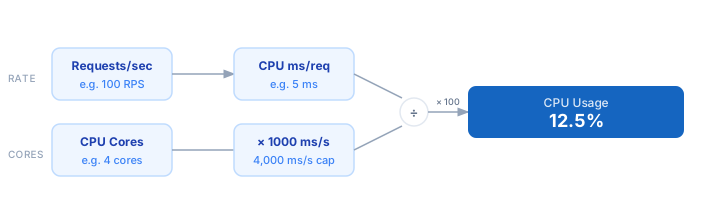
1. Measure or estimate the average CPU time your service spends per request in milliseconds — use profiling data, APM traces, or a load test. 2. Know your request arrival rate in requests per second (RPS) — from logs, an APM dashboard, or projected growth. 3. Enter the number of logical CPU cores available to the process (vCPUs on cloud instances count as cores). 4. The calculator multiplies RPS × CPU ms to get total CPU work per second, then divides by cores × 1000 ms to get the fraction of capacity consumed. 5. The result is the estimated CPU utilization as a percentage. Targets above 70–80% warrant adding cores or optimising the hot path.
Formula
CPU Usage (%) = (RPS × CPU ms per request) / (Cores × 1000) × 100

RPS              — requests arriving per second
CPU ms/request   — average CPU time consumed per request (milliseconds)
Cores            — number of logical CPU cores available
1000             — milliseconds per second (normalisation constant)
Example CPU Usage Calculations
Example 1 — Node.js API at moderate load
RPS: 100   ×   CPU ms: 5 ms   =   500 ms/s of CPU work
Cores: 4   →   capacity = 4 × 1,000 = 4,000 ms/s
CPU Usage = 500 / 4,000 × 100 = 12.5%
— Well within safe limits; plenty of headroom for traffic spikes.
Example 2 — Python Flask service approaching saturation
RPS: 80   ×   CPU ms: 45 ms   =   3,600 ms/s of CPU work
Cores: 4   →   capacity = 4,000 ms/s
CPU Usage = 3,600 / 4,000 × 100 = 90%
— Dangerously high. Add 2 more cores or reduce CPU ms to ~22 ms to stay below 70%.
Example 3 — Go microservice on a 16-core instance
RPS: 5,000   ×   CPU ms: 0.8 ms   =   4,000 ms/s of CPU work
Cores: 16   →   capacity = 16,000 ms/s
CPU Usage = 4,000 / 16,000 × 100 = 25%
— Efficient. Could right-size to an 8-core instance (50% usage) and halve the compute bill.
Tips for Accurate CPU Capacity Planning
- › Profile under realistic load, not idle. CPU time per request measured during a load test is far more accurate than a single ad-hoc call — cold JIT, caches, and GC pauses all affect the number.
- › Target 60–70% steady-state utilisation to absorb traffic spikes without service degradation. At 80%+ even small bursts cause latency tail blowout.
- › On Kubernetes, set <code>resources.requests.cpu</code> to your estimated steady-state usage and <code>resources.limits.cpu</code> to your spike ceiling. Mismatched values are the #1 cause of unexpected throttling.
- › Separate CPU time from wall-clock time. A request that takes 200 ms end-to-end may only burn 8 ms of CPU — the rest is network or DB wait. Use the CPU-only number in this estimator.
- › Use the <a href="/calculators/thread-pool-size-calculator">Thread Pool Size Calculator</a> alongside this tool if your service spawns threads per request — CPU saturation and thread exhaustion are independent failure modes.
- › Re-estimate after every major dependency upgrade, framework version bump, or query plan change. CPU profiles drift significantly across releases.
Notes
- › Results are estimates and may vary based on actual usage.
- › Always validate against your production environment.