Index Size Calculator
Data & FormatsEstimate how much disk space a database index will consume given your row count, key size, fill factor, and page size. Works for B-tree indexes on PostgreSQL, MySQL, and most relational databases.
Last updated: April 2026
This calculator is designed for real-world usage based on typical engineering scenarios and publicly available documentation.
The index size calculator helps you predict how large a B-tree database index will be before you create it — or diagnose why an existing index is consuming more disk than expected. Understanding index size is essential for capacity planning, replica provisioning, and keeping autovacuum and reindex operations within maintenance windows. Index size depends on four variables: row count, the byte width of the indexed column(s), the fill factor (how full each page is allowed to get), and the page size your database uses. Most developers underestimate index size because they only think about the column data — but every B-tree entry also carries an 8-byte heap pointer, and fill factor leaves deliberate slack in each page to avoid page splits during inserts. This calculator is useful when adding an index to a large table (will it fit on the replica?), comparing a compact integer key vs a UUID (2× size difference), tuning fill factor on a hot write path (lower fill factor = larger index but fewer splits), or estimating disk growth for tables that receive millions of inserts per day.
How to Calculate Index Size
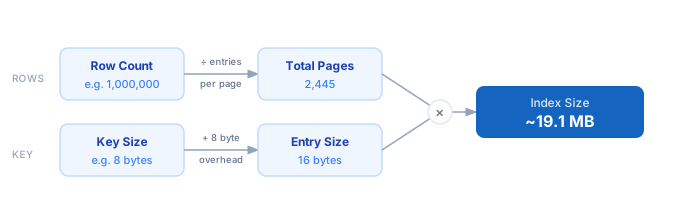
1. Determine the average key size — add up the byte widths of every column in the index (e.g. BIGINT = 8, INT = 4, UUID = 16, VARCHAR(n) ≈ actual average length). 2. Add 8 bytes of B-tree overhead per entry (heap pointer / item identifier). 3. Compute entries per page: floor(page_size × fill_factor / 100 ÷ entry_size). Default page size is 8192 bytes for PostgreSQL and SQLite; 16384 for MySQL InnoDB. 4. Compute total pages: ceil(row_count ÷ entries_per_page). 5. Multiply total pages by page size to get the total index size in bytes.
Formula
Entry Size       = Key Size (bytes) + 8
Entries Per Page = floor(Page Size × Fill Factor% ÷ Entry Size)
Total Pages      = ceil(Row Count ÷ Entries Per Page)
Index Size       = Total Pages × Page Size

Key Size    — sum of byte widths of all indexed columns
Fill Factor — % of each page used for entries (default 80%)
Page Size   — disk page size in bytes (PostgreSQL: 8192, MySQL InnoDB: 16384)
Example Index Size Calculations
Example 1 — BIGINT primary key on 1M-row table (PostgreSQL)
Rows: 1,000,000  |  Key Size: 8 bytes (BIGINT)  |  Fill Factor: 80%  |  Page Size: 8,192

Entry Size       = 8 + 8 = 16 bytes
Entries Per Page = floor(8,192 × 0.80 ÷ 16) = floor(409.6) = 409
Total Pages      = ceil(1,000,000 ÷ 409) = 2,445
Index Size       = 2,445 × 8,192 = 20,029,440 bytes ≈ 19.1 MB
Example 2 — UUID index on 10M-row table (PostgreSQL, lower fill factor)
Rows: 10,000,000  |  Key Size: 16 bytes (UUID)  |  Fill Factor: 75%  |  Page Size: 8,192

Entry Size       = 16 + 8 = 24 bytes
Entries Per Page = floor(8,192 × 0.75 ÷ 24) = floor(256.0) = 256
Total Pages      = ceil(10,000,000 ÷ 256) = 39,063
Index Size       = 39,063 × 8,192 = 320,004,096 bytes ≈ 305.2 MB

Switching to BIGINT (8 bytes) would halve entry size and save ~150 MB.
Example 3 — VARCHAR(50) index on 100M-row table (MySQL InnoDB)
Rows: 100,000,000  |  Key Size: 50 bytes (VARCHAR avg)  |  Fill Factor: 70%  |  Page Size: 16,384

Entry Size       = 50 + 8 = 58 bytes
Entries Per Page = floor(16,384 × 0.70 ÷ 58) = floor(197.7) = 197
Total Pages      = ceil(100,000,000 ÷ 197) = 507,615
Index Size       = 507,615 × 16,384 = 8,316,764,160 bytes ≈ 7.75 GB
Tips to Keep Index Size Under Control
- › Choose the smallest key type that fits your data. A BIGINT (8 bytes) index is half the size of a UUID (16 bytes) index. On 100M rows, that difference is several hundred MB of RAM and disk.
- › Use a partial index to exclude rows you never query. <code>WHERE deleted_at IS NULL</code> can reduce an index to 10% of the full-table size on soft-delete tables.
- › Lower fill factor (70–75%) on write-heavy tables to reduce page splits. The larger index trades disk space for fewer fragmentation-related rewrites and better write throughput over time.
- › Run <code>SELECT pg_size_pretty(pg_relation_size('your_index_name'))</code> in PostgreSQL to measure the actual index size after creation. Compare against this calculator's estimate to validate assumptions.
- › Composite indexes are not free — every additional column adds its byte width to every entry. Add columns in selectivity order (highest-cardinality first) and only include columns that are actually used in queries.
- › After heavy deletes, run <code>REINDEX</code> or <code>VACUUM</code> to reclaim bloat. Dead index entries still occupy pages and inflate the size reported by this calculator vs. the live data.
Notes
- › Results are estimates and may vary based on actual usage.
- › Always validate against your production environment.
Frequently Asked Questions
What is database index size and why does it matter? +
REINDEX operations take during maintenance windows. How does fill factor affect index size? +
What is the page size for PostgreSQL vs MySQL? +
innodb_page_size setting. SQLite defaults to 4,096 bytes. Enter the correct page size for your database to get an accurate estimate. How do I measure the actual size of an index in PostgreSQL? +
SELECT pg_size_pretty(pg_relation_size('your_index_name')); to get the live size. Use \di+ in psql to list all indexes with their sizes. For a full breakdown including TOAST and visibility maps, use pg_total_relation_size. Compare these numbers against this calculator's estimates to validate your key size and fill factor assumptions. Why is my actual index larger than the calculated estimate? +
VACUUM ANALYZE and then re-measure. For storage cost implications of large indexes, see the Storage Cost Calculator.