Thread Pool Size Calculator
API & BackendEnter your CPU count, utilization target, and I/O wait ratio to get the recommended thread pool size. Built on the Brian Goetz formula used in Java Concurrency in Practice.
Last updated: April 2026
This calculator is designed for real-world usage based on typical engineering scenarios and publicly available documentation.
The thread pool size calculator helps you find the optimal number of threads for your application using the well-established Brian Goetz formula from Java Concurrency in Practice. Choosing the wrong pool size is one of the most common performance mistakes in concurrent systems — too few threads and you leave CPU cycles idle during I/O waits; too many and you pay for context-switching overhead that hurts throughput. The formula accounts for the key variable most developers ignore: the ratio of wait time to compute time. An I/O-bound service that spends most of its time waiting on database queries or HTTP responses can safely run far more threads than its CPU count suggests. A CPU-bound workload like image processing or cryptography should stay close to the number of physical cores. This calculator is useful for sizing thread pools in Java (Executors, Spring, Tomcat), Go goroutine worker pools, Node.js cluster workers, Python ThreadPoolExecutor, and any system where you control concurrency limits. It is equally applicable to connection pools for databases and HTTP clients. Input your server's CPU count, the fraction of CPU you want to target (leave headroom for the OS and other processes), and the average wait-to-compute ratio for your workload. The result is the minimum pool size needed to hit your utilization target — round up and add a small buffer for production deployments.
How to Calculate Thread Pool Size
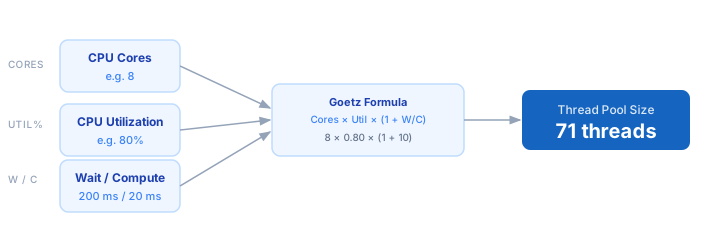
1. Count available CPU cores on your server (logical cores, including hyperthreads). 2. Set a target CPU utilization — typically 70–80% to leave headroom for GC, OS tasks, and traffic spikes. 3. Profile a representative request to measure average I/O wait time (database, network, disk) and pure compute time. 4. Divide wait time by compute time to get the blocking coefficient. 5. Apply the formula: Pool Size = CPU Cores × Utilization × (1 + Wait / Compute). 6. Ceil the result and add 10–20% buffer for production deployments.
Formula
Pool Size = CPU Cores × (CPU Utilization / 100) × (1 + Wait Time / Compute Time)

CPU Cores        — logical cores available to the process
CPU Utilization  — fraction of CPU to target (e.g. 80 for 80%)
Wait Time        — average time per request spent blocked on I/O (ms)
Compute Time     — average time per request spent on CPU work (ms)

Source: Brian Goetz, Java Concurrency in Practice (2006)
Example Thread Pool Size Calculations
Example 1 — I/O-bound REST API (typical web service)
CPU Cores:    8
Utilization:  80%
Wait Time:    200 ms  (DB query + network)
Compute Time:  20 ms  (JSON serialisation)

Pool Size = 8 × 0.80 × (1 + 200 / 20)
          = 8 × 0.80 × 11
          = 70.4  →  71 threads
Example 2 — CPU-bound image processing service
CPU Cores:   16
Utilization:  70%
Wait Time:    10 ms  (minimal I/O)
Compute Time: 90 ms  (resize + encode)

Pool Size = 16 × 0.70 × (1 + 10 / 90)
          = 16 × 0.70 × 1.11
          = 12.4  →  13 threads
Example 3 — Mixed workload (microservice with DB + cache)
CPU Cores:    4
Utilization:  75%
Wait Time:   120 ms  (DB 80 ms + Redis 40 ms)
Compute Time:  30 ms  (business logic)

Pool Size = 4 × 0.75 × (1 + 120 / 30)
          = 4 × 0.75 × 5
          = 15 threads
Tips for Sizing Thread Pools in Production
- › Profile before you size. Measure actual wait time and compute time under realistic load — synthetic benchmarks often underestimate I/O latency, leading to under-sized pools.
- › Leave CPU headroom. Target 70–80% utilisation, not 100%. The remaining 20–30% absorbs GC pauses, traffic bursts, and OS scheduling without causing latency spikes.
- › Size connection pools to match your thread pool. If you have 70 threads hitting a database, your DB connection pool must be at least 70 — otherwise threads will queue waiting for a connection.
- › Use the <a href="/calculators/concurrency-calculator">Concurrency Calculator</a> alongside this tool to verify your pool can sustain your target QPS without queuing.
- › Monitor queue depth, not just thread count. A healthy pool has near-zero queue depth at steady state. Growing queues signal the pool is too small or upstream services are slowing down.
- › Re-measure after major changes. Adding caching, switching databases, or changing frameworks all shifts the wait/compute ratio significantly — recalculate after each architectural change.
Notes
- › Results are estimates and may vary based on actual usage.
- › Always validate against your production environment.