Worker Queue Throughput Calculator
API & BackendEnter your worker count, task duration, and queue size to instantly calculate throughput in tasks per second and queue drain time. Built for backend engineers sizing job queues, thread pools, and message brokers.
Last updated: April 2026
This calculator is designed for real-world usage based on typical engineering scenarios and publicly available documentation.
This worker queue throughput calculator tells you exactly how many tasks your worker pool processes per second, and how long it will take to drain an existing backlog. Backend engineers use it when sizing Sidekiq, Celery, BullMQ, Kafka consumers, and custom worker processes — before deploying, not after a queue backs up in production. Throughput scales linearly with workers: if 10 workers each take 500 ms per task, the pool processes 20 tasks per second. Double the workers or halve the task duration and you double the throughput — until you hit a shared bottleneck like a database connection pool, a rate-limited API, or CPU contention. Drain time answers the other side of the equation: given a backlog of N tasks and a known throughput rate, how long until the queue empties? This is critical when a deploy causes a spike, a cron job drops 100,000 tasks at midnight, or a consumer group falls behind and you need to estimate recovery time before an SLA breach. Combine this calculator with a concurrency model when sizing your thread pool. If downstream dependencies are rate-limited, adding more workers past that limit creates contention without increasing throughput — use the API rate limit and concurrency calculators alongside this one.
How to Calculate Worker Queue Throughput
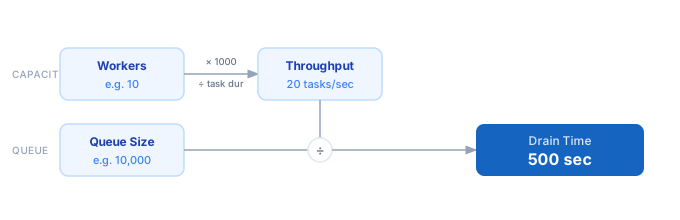
1. Enter the number of concurrent workers — processes, threads, or goroutines that pull tasks from the queue simultaneously. 2. Enter the average task duration in milliseconds — how long a single worker spends on one task from dequeue to completion. 3. Enter the queue size — the total number of tasks currently waiting or expected to accumulate. 4. The calculator divides workers by task duration (converted to seconds) to get throughput in tasks per second. 5. It then divides queue size by throughput to give the drain time — how long until the queue reaches zero at current throughput. 6. Adjust worker count or task duration to hit a target throughput or drain time that meets your SLA.
Formula
Throughput (tasks/sec) = Workers / (Task Duration ms / 1000)
Drain Time (sec)       = Queue Size / Throughput

Workers       — number of concurrent workers (processes, threads, goroutines)
Task Duration — average time one worker spends on a single task, in milliseconds
Queue Size    — total number of tasks to drain
Throughput    — tasks processed per second across all workers
Drain Time    — seconds until the queue reaches zero at current throughput
Example Worker Queue Throughput Calculations
Example 1 — Sidekiq job queue with 5 workers
Workers:       5
Task Duration: 200 ms
Queue Size:    3,000 jobs

Throughput = 5 / (200 / 1000) = 5 / 0.2 = 25 jobs/sec
Drain Time = 3,000 / 25 = 120 sec (2 minutes)
Example 2 — Celery task queue processing large payloads
Workers:       20
Task Duration: 1,500 ms
Queue Size:    50,000 tasks

Throughput = 20 / (1500 / 1000) = 20 / 1.5 ≈ 13.3 tasks/sec
Drain Time = 50,000 / 13.3 ≈ 3,759 sec (~62 minutes)
Example 3 — BullMQ queue recovering from overnight backlog
Workers:       50
Task Duration: 100 ms
Queue Size:    500,000 tasks

Throughput = 50 / (100 / 1000) = 50 / 0.1 = 500 tasks/sec
Drain Time = 500,000 / 500 = 1,000 sec (~16.7 minutes)
Tips to Improve Worker Queue Throughput
- › Scale workers horizontally before optimising task duration — adding workers is usually cheaper than rewriting job logic, and throughput scales linearly with worker count until you hit a shared resource bottleneck.
- › Profile your slowest tasks. A single 5-second task occupies a worker 25× longer than a 200 ms task. Move slow I/O-heavy tasks (e.g. external API calls) to a dedicated low-priority queue with fewer workers.
- › Set a concurrency limit that matches your downstream resource. If each worker makes one database query, cap workers at the database connection pool size to avoid connection exhaustion and queueing inside the pool.
- › Use the drain time formula to set your autoscaling trigger. If your target drain time is under 5 minutes, alert when queue size / current throughput exceeds 300 seconds — before it becomes a problem.
- › Batch small tasks. If individual task duration is under 50 ms, queue overhead (serialisation, dequeue, ack) may dominate. Grouping 10–50 tasks per job can raise effective throughput by 2–5×.
- › For <a href="/calculators/api-rate-limit-calculator">rate-limited downstream APIs</a>, cap worker count to stay within the API's requests-per-second limit — more workers will not help and will trigger 429 errors that further degrade throughput.
Notes
- › Results are estimates and may vary based on actual usage.
- › Always validate against your production environment.