API Rate Limit Calculator
API & BackendEnter your rate limit and time window to see the total request budget instantly. Works in seconds, minutes, or hours — no manual unit conversion.
Last updated: April 2026
This calculator is designed for real-world usage based on typical engineering scenarios and publicly available documentation.
Hitting a 429 Too Many Requests error in production is painful — especially when the root cause is a rate limit you could have planned around. API rate limits define how many requests you can make per second, minute, or hour, and exceeding them triggers retries, backoff delays, and degraded user experience. This API rate limit calculator tells you exactly how many total requests your integration can make in any time window. Enter your rate in requests per second and a duration, and you'll see the total request budget instantly. Unit conversion is automatic — work in seconds, minutes, or hours without manual math. Use it to size a data sync job within your API quota, determine how long a batch of N requests will take at your current rate, validate whether a polling interval keeps you safely under the limit, or compare throughput across API tiers.
How to Calculate API Rate Limits
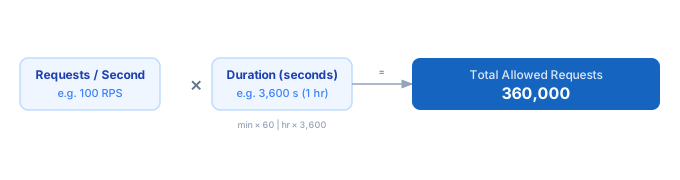
1. Enter your rate limit in requests per second (RPS). If your API specifies requests per minute, divide by 60 to convert. 2. Enter the duration of your time window. 3. Select the unit: seconds, minutes, or hours. 4. The calculator converts duration to seconds and multiplies by your RPS to give the total allowed requests.
Formula
Total Requests = Requests per Second (RPS) × Duration in Seconds

Duration conversions:
- Minutes → multiply by 60
- Hours   → multiply by 3,600

Useful conversions:
- 100 req/min = 100 ÷ 60 ≈ 1.67 RPS
- 1,000 req/hr = 1,000 ÷ 3,600 ≈ 0.28 RPS
Example Rate Limit Calculations
Example 1 — Hourly sync job (50 RPS limit)
RPS: 50   Duration: 1 hour = 3,600 seconds
Total budget = 50 × 3,600 = 180,000 requests

If the job needs 200,000 records:
200,000 ÷ 180,000 = 1.11 hours — won't finish in one window
Fix: extend to 2 hours (360,000 budget) or split across two API keys.
Example 2 — Real-time webhook consumer (10 RPS limit)
RPS: 10   Duration: 5 minutes = 300 seconds
Total budget = 10 × 300 = 3,000 requests per 5-minute window

At peak load of 50 events/sec, you'll exhaust the budget in 60 seconds.
Fix: queue events and process at ≤10 RPS, or request a higher tier.
Example 3 — Bulk data export (1,000 req/min limit)
API limit: 1,000 req/min = 1,000 ÷ 60 ≈ 16.67 RPS
Duration: 30 minutes = 1,800 seconds
Total budget = 16.67 × 1,800 = 30,000 requests

At 1 record per request: 30,000 records exportable in 30 minutes.
Tips to Stay Within API Rate Limits
- › Convert your rate limit to RPS first. Most APIs specify per-minute or per-hour limits — divide by 60 or 3,600 to get RPS for easy comparison.
- › Use exponential backoff on 429 responses. Start with a 1-second delay, double on each retry, cap at 60 seconds. Most APIs include a Retry-After header.
- › Queue and throttle at the application level. A token bucket or leaky bucket algorithm smooths request spikes before they hit the API.
- › Cache aggressively. If two requests would return the same data, cache the first response and skip the second. Even a 30-second TTL can cut API calls dramatically at scale.
- › Monitor your actual request rate in production. Log the timestamp of every API call and alert when your rolling average exceeds 80% of the limit.
Notes
- › Results are estimates and may vary based on actual usage.
- › Always validate against your production environment.