QPS Calculator
API & BackendEnter your total request count and time window to calculate average and peak QPS instantly. Built for backend engineers sizing APIs, rate limits, and infrastructure.
Last updated: April 2026
This calculator is designed for real-world usage based on typical engineering scenarios and publicly available documentation.
A QPS calculator converts raw request counts into the queries-per-second rate your system must sustain, which is the metric that actually drives infrastructure sizing decisions. Knowing your average QPS tells you how much steady-state capacity you need; knowing your peak QPS tells you how much headroom to build in before you start dropping requests. Backend engineers use QPS to set rate limits, size connection pools, choose instance counts, and negotiate SLAs. SREs use it to decide when to trigger autoscaling and what runbook thresholds to set. If you're planning a new service, forecasting traffic growth, or post-morteming an incident, the first question is always "what was the QPS at the time?" The peak multiplier accounts for the fact that traffic is never flat. A service handling 1M requests/day on average might see 3–5× that rate during a flash sale, a viral moment, or a scheduled batch job. Industry convention is to provision for 2–3× average QPS for consumer APIs and 4–5× for event-driven or batch-adjacent workloads. This calculator works for any unit — HTTP requests, database queries, message-queue events, gRPC calls. The formula is the same: divide total events by the observation window in seconds.
How to Calculate QPS (Queries Per Second)
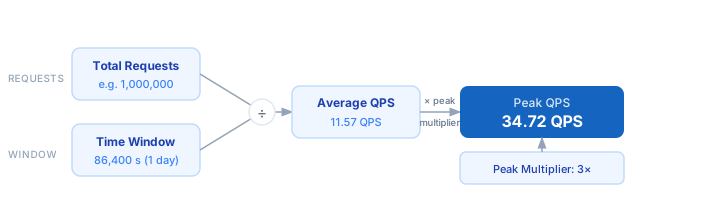
1. Count the total number of requests (or queries, events, or messages) in a given period. 2. Convert your observation window to seconds — 1 hour = 3,600 s, 1 day = 86,400 s. 3. Divide total requests by seconds to get Average QPS. 4. Multiply Average QPS by your Peak Multiplier (typically 2–5×) to get Peak QPS. 5. Use Peak QPS to size your servers, connection pools, and rate-limit thresholds.
Formula
Average QPS = Total Requests ÷ Time Window (seconds)
Peak QPS    = Average QPS × Peak Multiplier

Total Requests  — number of requests (HTTP, DB queries, events, etc.) in the window
Time Window     — observation period in seconds (86400 = 1 day, 3600 = 1 hour)
Peak Multiplier — ratio of peak traffic to average (commonly 2–5×)
Example QPS Calculations
Example 1 — REST API with 1M daily requests
Total Requests: 1,000,000
Time Window:    86,400 seconds (1 day)
Average QPS:    1,000,000 ÷ 86,400  =  11.57 QPS
Peak Multiplier: 3×
Peak QPS:       11.57 × 3  =  34.72 QPS
→ Provision for ~35 QPS; each 2-vCPU instance handling 50 QPS gives you 1 instance + headroom.
Example 2 — High-traffic e-commerce checkout during sale (10M requests/hour)
Total Requests: 10,000,000
Time Window:    3,600 seconds (1 hour)
Average QPS:    10,000,000 ÷ 3,600  =  2,778 QPS
Peak Multiplier: 5× (flash-sale spike)
Peak QPS:       2,778 × 5  =  13,889 QPS
→ Need infrastructure able to sustain ~14k QPS; consider horizontal autoscaling triggered at 70% capacity.
Example 3 — Database read replica sizing (500k queries over 10 minutes)
Total Requests: 500,000
Time Window:    600 seconds (10 minutes)
Average QPS:    500,000 ÷ 600  =  833 QPS
Peak Multiplier: 2×
Peak QPS:       833 × 2  =  1,667 QPS
→ A single read replica rated at 2,000 QPS covers peak with 17% spare capacity — add a second replica for HA.
Tips for QPS Capacity Planning
- › Always size for peak, not average. Average QPS tells you baseline cost; peak QPS tells you the failure threshold. Set autoscaling triggers at 60–70% of your peak-rated capacity.
- › Use a 3× peak multiplier as a starting point for consumer-facing APIs. Increase to 5× if you run time-limited promotions, batch jobs that overlap with live traffic, or have upstream services that retry aggressively.
- › Convert to the right granularity before comparing. A dashboard showing "10k RPM" means 167 RPS — always normalise to per-second before feeding numbers into rate limiters or quotas, which operate in per-second windows.
- › Log actual peak QPS in your APM tool (Datadog, Grafana, CloudWatch) and compare it against your provisioned ceiling each quarter. Capacity that felt generous at launch often looks tight after 6 months of growth.
- › If your service is behind an API gateway, use the <a href="/calculators/api-rate-limit-calculator">API Rate Limit Calculator</a> to align gateway throttle limits with your infrastructure's sustainable QPS so upstream limits fire before downstream systems saturate.
- › For latency-sensitive APIs, check that your p99 latency stays within budget at peak QPS using the <a href="/calculators/latency-budget-calculator">Latency Budget Calculator</a> — high QPS and tight latency targets together define your real concurrency requirement.
Notes
- › Results are estimates and may vary based on actual usage.
- › Always validate against your production environment.
Frequently Asked Questions
What is QPS and why does it matter? +
What is a good peak multiplier to use? +
What is the difference between QPS, RPS, and TPS? +
How do I find my actual QPS from logs or metrics? +
COUNT(*) / TIMESTAMPDIFF(SECOND, MIN(ts), MAX(ts)). In PromQL: rate(http_requests_total[5m]) gives you a 5-minute rolling average QPS. Always sample a representative weekday, not just off-peak windows.