Concurrency Calculator
API & BackendEnter your requests per second and average response time to instantly calculate how many concurrent connections or workers your service needs. Based on Little's Law.
Last updated: April 2026
This calculator is designed for real-world usage based on typical engineering scenarios and publicly available documentation.
The concurrency calculator uses Little's Law — one of the most important results in queuing theory — to determine how many simultaneous connections, threads, or workers a system needs to sustain a target throughput. If you're sizing a connection pool, configuring a thread pool, or setting max_workers on a worker fleet, this is the number you need. The formula is simple: Concurrency = RPS × Average Latency (in seconds). At 100 requests per second with a 200 ms average response time, your service must hold 20 requests in flight at any moment. Underestimate this and requests queue up; your p99 latency spikes before your CPU does. Engineers use this calculator when provisioning database connection pools (pgBouncer, HikariCP), sizing HTTP client pools (httpx, axios), setting Gunicorn or Uvicorn worker counts, or configuring concurrency limits in async job queues like Celery or BullMQ. The safety factor field adds headroom above the theoretical minimum — a 1.5× multiplier is common for production services to absorb traffic spikes and GC pauses without exhausting the pool.
How to Calculate API Concurrency with Little's Law
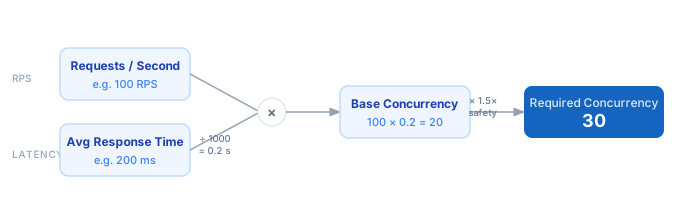
1. Measure or estimate your peak requests per second (RPS). Use your APM, load balancer logs, or a target from a load test. 2. Measure average response time in milliseconds. Use the p50 latency from your observability stack — not p99, which inflates the pool size unnecessarily. 3. Plug both values into the calculator. The base concurrency is RPS × (latency ÷ 1000). 4. Apply a safety factor (1.25–2.0×) to absorb burst traffic, GC pauses, and downstream slowdowns. 5. Round up to the next integer — that's your minimum pool or worker count. Set your connection pool max to at least this value.
Formula
Concurrency = RPS × (Avg Latency ms ÷ 1000)
Safe Concurrency = ⌈Concurrency × Safety Factor⌉

RPS            — requests per second at peak load
Avg Latency ms — average response time in milliseconds (use p50)
Safety Factor  — headroom multiplier, typically 1.25–2.0
⌈ ⌉            — ceiling (round up to nearest integer)
Example Concurrency Calculations
Example 1 — REST API with database queries
RPS: 200   Avg latency: 150 ms   Safety: 1.5×

Base concurrency = 200 × (150 ÷ 1000) = 200 × 0.15 = 30
Safe concurrency = ⌈30 × 1.5⌉ = ⌈45⌉ = 45

Set max_connections = 45 in your connection pool config.
Example 2 — High-throughput event ingestion service
RPS: 5,000   Avg latency: 20 ms   Safety: 2.0×

Base concurrency = 5000 × (20 ÷ 1000) = 5000 × 0.02 = 100
Safe concurrency = ⌈100 × 2.0⌉ = 200

Deploy 200 async workers or set semaphore limit to 200.
Example 3 — Background job worker fleet (slow LLM calls)
RPS: 10   Avg latency: 8,000 ms (8 s LLM response)   Safety: 1.25×

Base concurrency = 10 × (8000 ÷ 1000) = 10 × 8 = 80
Safe concurrency = ⌈80 × 1.25⌉ = 100

Run 100 worker processes to keep the queue drained.
Tips for Sizing Concurrency in Production
- › Use p50 latency — not p99 — as your input. p99 includes tail outliers that skew the pool far too large. Size for the typical request, then add your safety factor for the rest.
- › Revisit concurrency after every major latency change. A database index addition that cuts avg latency from 200 ms to 50 ms reduces required concurrency by 4×. Oversized pools waste memory and increase connection churn.
- › For database connection pools, keep the pool smaller than your DB's max_connections limit. PostgreSQL defaults to 100; most apps should stay under 80% of that and use pgBouncer in transaction mode for high-concurrency services.
- › HTTP client pools need separate sizing from DB pools. An external API call at 500 ms avg latency with 50 RPS requires 25 HTTP connections — configure your httpx.AsyncClient or axios pool accordingly.
- › Monitor pool wait time, not just pool size. If requests are waiting for a free connection, your pool is undersized. If pool utilisation stays below 30%, it's oversized and wasting resources.
- › For async frameworks (FastAPI, Node.js), concurrency is handled by the event loop — but external I/O (DB, HTTP) still needs bounded semaphores. Use asyncio.Semaphore or a connection pool to enforce the calculated limit.
Notes
- › Results are estimates and may vary based on actual usage.
- › Always validate against your production environment.