Throughput Calculator
API & BackendEnter your total requests, time window, and average response size to instantly calculate throughput in RPS and MB/s. Built for API engineers and backend developers planning system capacity.
Last updated: April 2026
This calculator is designed for real-world usage based on typical engineering scenarios and publicly available documentation.
A throughput calculator helps you convert raw request counts into the requests-per-second (RPS) and data throughput figures that matter for API design, load testing, and capacity planning. Whether you are sizing infrastructure for a new service or diagnosing a performance bottleneck, knowing your actual throughput is the starting point. Backend engineers use throughput metrics to validate that a system meets its SLA targets, set auto-scaling thresholds, and predict bandwidth costs. A service handling 10,000 requests per minute has very different infrastructure needs than one handling 10,000 per second — and the data throughput figure tells you whether your network tier will saturate before your compute does. This calculator combines request rate with average payload size to give you both dimensions simultaneously. Pair it with the QPS Calculator when you need to convert queries-per-second for database layers, or use the API Rate Limit Calculator to check whether your throughput stays within upstream provider quotas.
How to Calculate API Throughput
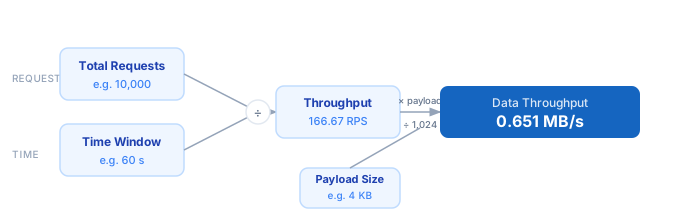
1. Count the total number of requests processed during a known time window — from logs, a load test, or a monitoring dashboard. 2. Convert the time window to seconds (e.g. 5 minutes = 300 seconds). 3. Divide total requests by seconds to get Throughput in RPS. 4. Multiply RPS by the average response payload size in KB, then divide by 1,024 to get data throughput in MB/s. 5. Multiply RPS by 86,400 to estimate the daily request volume at that sustained rate.
Formula
Throughput (RPS)    = Total Requests ÷ Time Window (seconds)
Data Throughput     = (RPS × Avg Response Size KB) ÷ 1,024   [MB/s]
Daily Volume        = RPS × 86,400

Total Requests      — number of requests observed or expected in the window
Time Window         — duration of the observation period in seconds
Avg Response Size   — mean payload size returned per request, in kilobytes
Example Throughput Calculations
Example 1 — REST API load test
Total Requests:  10,000   over   60 seconds
Avg Response:    4 KB

Throughput = 10,000 ÷ 60 = 166.67 RPS
Data throughput = (166.67 × 4) ÷ 1,024 = 0.651 MB/s
Daily volume at this rate = 166.67 × 86,400 ≈ 14,400,480 requests/day
Example 2 — High-traffic JSON API
Total Requests:  500,000   over   300 seconds (5 min)
Avg Response:    12 KB

Throughput = 500,000 ÷ 300 = 1,666.67 RPS
Data throughput = (1,666.67 × 12) ÷ 1,024 = 19.53 MB/s
Daily volume at this rate = 1,666.67 × 86,400 ≈ 144,000,288 requests/day
Example 3 — Lightweight health-check endpoint
Total Requests:  3,600   over   3,600 seconds (1 hour)
Avg Response:    0.5 KB

Throughput = 3,600 ÷ 3,600 = 1.00 RPS
Data throughput = (1.00 × 0.5) ÷ 1,024 = 0.000488 MB/s
Daily volume at this rate = 1.00 × 86,400 = 86,400 requests/day
Tips for Optimising API Throughput
- › Measure throughput over representative time windows — a 10-second spike after a cache warm-up will overstate steady-state RPS. Use a 5-minute window for meaningful baselines.
- › Reduce average response size with field filtering (GraphQL selections, REST sparse fieldsets). Halving payload size halves your bandwidth cost and often doubles effective throughput at the same RPS.
- › Use the <a href="/calculators/qps-calculator">QPS Calculator</a> alongside this tool to model database query load driven by your API tier — high RPS with a high queries-per-request ratio saturates DB connections long before app servers.
- › Check your <a href="/calculators/api-rate-limit-calculator">API rate limits</a> before assuming you can sustain peak RPS — provider quotas cap throughput independently of your infrastructure capacity.
- › Enable HTTP/2 or HTTP/3 on your API gateway. Multiplexing reduces connection overhead and typically improves sustainable RPS by 20–40% under real-world mixed-request workloads.
- › Monitor p95 and p99 latency alongside throughput. A system can sustain 1,000 RPS with a 99th-percentile latency of 5 seconds — that is a queue building, not healthy throughput.
Notes
- › Results are estimates and may vary based on actual usage.
- › Always validate against your production environment.