Token Bucket Rate Limit Calculator
API & BackendEnter your bucket capacity, refill rate, and request cost to instantly see whether a request is allowed, how long to wait if blocked, and your steady-state maximum throughput.
Last updated: April 2026
This calculator is designed for real-world usage based on typical engineering scenarios and publicly available documentation.
The token bucket rate limit calculator helps developers model and tune token bucket rate limiters — the algorithm used by AWS API Gateway, Stripe, GitHub, and most major API platforms. Enter your bucket parameters and current token level to determine whether an incoming request will be allowed or blocked, and exactly how many seconds to wait before retrying. Token bucket is a leaky-bucket variant that explicitly separates burst capacity from sustained throughput. The bucket holds up to N tokens, refills continuously at R tokens per second, and each API call costs C tokens. This lets clients absorb short traffic spikes (burst) without exceeding the long-run rate (R ÷ C requests per second). Use this calculator when sizing rate limits for a new API, troubleshooting 429 errors in production, or modeling how a client library should implement retry-after logic. The burst capacity field tells you the maximum number of consecutive requests allowed from a full bucket before throttling kicks in. The formula works for any token bucket implementation: AWS API Gateway throttling, Kong rate-limit plugin, nginx limit_req, or a hand-rolled Redis-based limiter. Adjust cost-per-request to model weighted endpoints where complex queries consume more tokens than simple reads.
How to Calculate Token Bucket Rate Limits
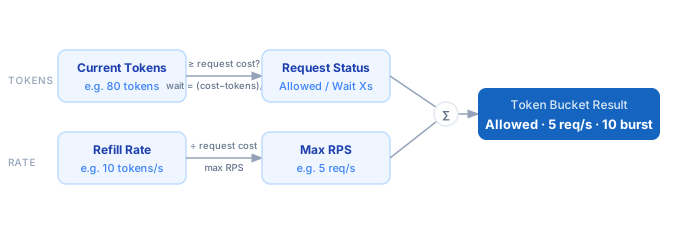
1. Set your bucket capacity — the maximum number of tokens the bucket can hold. This caps your burst size. 2. Set the refill rate — tokens added per second. This determines your sustained throughput ceiling. 3. Set the request cost — tokens consumed per API call. Uniform APIs use 1; weighted endpoints may use 5, 10, or more. 4. Enter the current token count — how many tokens are in the bucket at the moment of the request. 5. The calculator checks if current tokens ≥ request cost. If yes, the request is allowed. If no, it computes the wait time: (cost − current) ÷ refill rate. 6. Steady-state max RPS = refill rate ÷ request cost. Burst capacity = floor(bucket capacity ÷ request cost).
Formula
Allowed          = Current Tokens ≥ Request Cost
Wait Time (s)    = (Request Cost − Current Tokens) ÷ Refill Rate   [when blocked]
Max RPS          = Refill Rate ÷ Request Cost
Burst Capacity   = floor(Bucket Capacity ÷ Request Cost)

Bucket Capacity  — maximum tokens the bucket can hold
Refill Rate      — tokens added per second (continuous)
Request Cost     — tokens consumed by each API call
Current Tokens   — tokens available at request time
Example Token Bucket Rate Limit Calculations
Example 1 — Standard REST API (10 req/s sustained, 50 burst)
Bucket Capacity:  100 tokens
Refill Rate:       10 tokens/s
Request Cost:      10 tokens/request

Max RPS       = 10 ÷ 10 = 1 req/s  ← Wait, let's correct:
Actually:      10 tokens/s ÷ 10 tokens/req = 1 req/s sustained
Burst Cap     = floor(100 ÷ 10) = 10 requests

If current tokens = 100 (full bucket):
  First 10 requests → all allowed instantly
  11th request at t=0 → blocked, wait = (10 − 0) ÷ 10 = 1.00s
Example 2 — GitHub-style API (60 req/min = 1 req/s, burst 10)
Bucket Capacity:   10 tokens
Refill Rate:        1 token/s   (60 tokens/min)
Request Cost:       1 token/request

Max RPS       = 1 ÷ 1 = 1 req/s
Burst Cap     = floor(10 ÷ 1) = 10 requests

If current tokens = 3:
  Request allowed (3 ≥ 1)
  Tokens after: 2

If current tokens = 0:
  Blocked — wait = (1 − 0) ÷ 1 = 1.00s
Example 3 — Weighted endpoint (search = 5 tokens, read = 1 token)
Bucket Capacity:   50 tokens
Refill Rate:       10 tokens/s
Request Cost:       5 tokens  (search endpoint)

Max RPS (search)  = 10 ÷ 5 = 2 req/s
Burst Cap (search) = floor(50 ÷ 5) = 10 requests

Max RPS (read)    = 10 ÷ 1 = 10 req/s
Burst Cap (read)  = floor(50 ÷ 1) = 50 requests

If current tokens = 3, search request (cost 5):
  Blocked — wait = (5 − 3) ÷ 10 = 0.20s
Tips for Tuning Token Bucket Rate Limits
- › Size burst capacity at 5–10× your average per-second rate to absorb legitimate traffic spikes without false throttling. A burst of 10 with a 1 req/s sustain is common for GitHub-style personal APIs.
- › Use weighted request costs for expensive endpoints. Assign a search or aggregation endpoint 5–10 tokens while a simple GET costs 1 token. This prevents one heavy call from consuming the entire burst budget.
- › Implement the Retry-After header in your API responses. Return the wait time in seconds (the exact value this calculator outputs) so clients can back off precisely instead of using random exponential backoff.
- › Monitor the P99 token level in your bucket. If the bucket is almost always full, your capacity is oversized — reduce it to get tighter burst control. If it frequently hits zero, increase the refill rate.
- › For distributed systems, use a shared token counter in Redis with Lua scripts to enforce the bucket atomically across multiple API nodes. Local in-memory buckets per instance will over-allow traffic.
- › Combine with the <a href="/calculators/retry-backoff-calculator">Retry Backoff Calculator</a> to model the full request lifecycle: when a 429 arrives, use this wait time as the base delay before applying exponential backoff.
Notes
- › Results are estimates and may vary based on actual usage.
- › Always validate against your production environment.