Timeout Calculator
API & BackendEnter your P99 latency and safety multiplier to get a recommended timeout value and total deadline with retries. Works for any HTTP API, database, or microservice call.
Last updated: April 2026
This calculator is designed for real-world usage based on typical engineering scenarios and publicly available documentation.
A timeout calculator helps you set a safe, evidence-based timeout for any API call or network request. Setting a timeout too short causes false failures on slow-but-healthy services; setting it too long makes your system hang and cascade failures into dependent services. The right value is derived from measured latency, not guesswork. The standard approach is to take your P99 response time — the latency that 99% of requests fall under — and multiply by a safety factor (typically 2–3×). This gives headroom for occasional spikes without allowing runaway requests to stall threads. When retries are involved, the total deadline multiplies accordingly, so you can budget the worst-case wall-clock time before the caller gives up entirely. This calculator is useful for backend engineers configuring HTTP clients, database connection pools, gRPC stubs, and message queue consumers. It is equally applicable to infrastructure-level settings like ALB idle timeout, Lambda function timeout, or Kubernetes readiness probe timeouts. If you do not have P99 data yet, start with a conservative 3× your average latency as a placeholder and tighten it once you have production metrics from your APM tool.
How to Calculate the Right Timeout Value
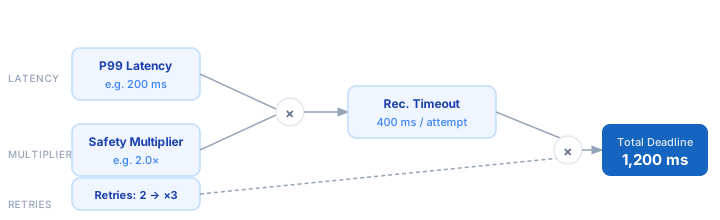
1. Measure your P99 latency — the response time that 99% of requests complete within. Pull this from your APM, logs, or load test results. 2. Choose a safety multiplier. A value of 2× is a common starting point; increase to 3× for high-variance or bursty services. 3. Recommended Timeout = P99 × Safety Multiplier. This is the per-attempt timeout you configure in your HTTP client or SDK. 4. Factor in retries. If your client retries on timeout, multiply the per-attempt timeout by (retries + 1) to get the total deadline. 5. Set your infrastructure timeout (e.g. load balancer, Lambda) to at least the total deadline so the caller is never killed before the final retry completes.
Formula
Recommended Timeout = P99 Latency × Safety Multiplier

Total Deadline      = Recommended Timeout × (Retries + 1)

P99 Latency        — latency at the 99th percentile (ms)
Safety Multiplier  — headroom factor, typically 2.0–3.0
Retries            — number of retry attempts after the initial try
Example Timeout Calculations
Example 1 — REST API with 2 retries
P99 Latency:       200 ms
Safety Multiplier: × 2.0
                   ──────────────
Recommended Timeout: 400 ms per attempt
Retries:           2  →  (2 + 1) = 3 attempts
Total Deadline:    400 ms × 3 = 1,200 ms (1.2 s)
Example 2 — Database query, no retries
P99 Latency:       50 ms
Safety Multiplier: × 3.0  (high variance OLAP query)
                   ──────────────
Recommended Timeout: 150 ms per attempt
Retries:           0  →  1 attempt only
Total Deadline:    150 ms
Example 3 — Slow third-party enrichment API
P99 Latency:       1,200 ms
Safety Multiplier: × 2.5
                   ──────────────
Recommended Timeout: 3,000 ms (3 s) per attempt
Retries:           1  →  2 attempts
Total Deadline:    3,000 ms × 2 = 6,000 ms (6 s)
Tips for Setting Timeouts Correctly
- › Always derive timeouts from measured P99 latency, not intuition. Pull the value from your APM tool (Datadog, Grafana, New Relic) before configuring any client.
- › Use different timeouts for different operations. A fast status-check endpoint and a slow report-generation endpoint should never share the same timeout value.
- › Set your infrastructure timeout (load balancer, Lambda, Kubernetes ingress) to slightly exceed the total deadline including retries, or the outer layer will abort before the final retry completes.
- › Combine timeouts with circuit breakers. A timeout protects a single call; a circuit breaker stops hammering a degraded service when many calls are timing out. Use both.
- › Reduce total deadline by shortening retries rather than timeout. Cutting retries from 3 to 1 halves worst-case wall time without changing per-call headroom.
- › Re-measure P99 after every major traffic increase or dependency upgrade — latency distributions shift and your timeout baseline becomes stale.
Notes
- › Results are estimates and may vary based on actual usage.
- › Always validate against your production environment.