Latency Budget Calculator
PerformanceDistribute your total response-time SLA across every service layer and instantly see how much headroom remains. Built for backend engineers designing latency-sensitive systems.
Last updated: April 2026
This calculator is designed for real-world usage based on typical engineering scenarios and publicly available documentation.
A latency budget calculator helps you allocate your total end-to-end response time across every layer of your stack — DNS resolution, auth, business logic, database queries, and serialization. Without explicit budgets, each team optimises in isolation and you only discover the problem when the whole system misses its SLA. Distributed systems engineers, platform teams, and SREs use latency budgets during architecture reviews and capacity planning. If your API promises p99 responses under 500 ms, this tool makes it immediately visible whether your current breakdown leaves sufficient headroom or already exceeds the target. The calculation is straightforward: sum each component's allocated time and subtract from the total budget. Any positive remainder is headroom; a negative remainder signals you need to optimise at least one layer before shipping. Use the worked examples below as a starting point for common web and microservice architectures.
How to Calculate a Latency Budget
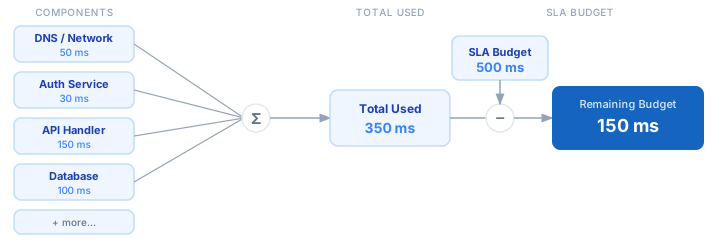
1. Identify your SLA or target p99 latency — this is your total budget (e.g. 500 ms). 2. List every service or network hop involved in a single request: DNS, TLS handshake, auth check, main handler, database, caches, downstream APIs, and response serialization. 3. Assign a realistic latency target to each component based on current benchmarks or p99 measurements from your observability stack. 4. Sum all component targets and subtract from the total budget. 5. A positive remainder is headroom for unexpected spikes. Aim for at least 10–20% unallocated buffer. 6. Re-run the calculator after each optimisation pass to track progress toward your SLA.
Formula
Remaining Budget = Total Budget − Σ Component Latencies

Total Budget       — your SLA or p99 target in milliseconds
Component Latency  — measured or estimated p99 for each layer
Σ Components       — sum of all individual component targets
Remaining Budget   — positive = headroom, negative = over budget
Example Latency Budget Calculations
Example 1 — Standard REST API with database (500 ms SLA)
Total Budget:            500 ms
  DNS / Network:          50 ms
  TLS + Auth:             30 ms
  API Handler:            50 ms
  Primary DB query:      100 ms
  Cache lookup:           10 ms
  Response serialization: 20 ms
                         ────────
  Total Used:            260 ms
  Remaining headroom:    240 ms  (48% buffer — healthy)
Example 2 — Microservices fan-out (200 ms SLA)
Total Budget:            200 ms
  Ingress / LB:           10 ms
  Auth service:           25 ms
  Service A (products):   60 ms
  Service B (inventory):  55 ms
  Aggregator + render:    30 ms
  Egress serialization:   15 ms
                         ────────
  Total Used:            195 ms
  Remaining headroom:      5 ms  (2.5% — dangerously thin, optimise Service A or B)
Example 3 — LLM-backed API (3000 ms SLA)
Total Budget:           3000 ms
  Network round-trip:      80 ms
  Auth + rate-limit:       20 ms
  Prompt construction:     50 ms
  LLM inference:         2400 ms
  Response parsing:        30 ms
                         ────────
  Total Used:            2580 ms
  Remaining headroom:     420 ms  (14% buffer — acceptable for LLM workloads)
Tips for Managing Your Latency Budget
- › Measure before you allocate. Use real p99 data from your observability stack (Datadog, Grafana, OpenTelemetry) — not p50 averages. Budget for tail latency, not median.
- › Reserve 10–20% of your total budget as an unallocated buffer. Unexpected GC pauses, cold starts, and network jitter will consume it.
- › Treat external API calls as fixed costs. If a downstream service has a p99 of 200 ms you cannot control, build your budget around that constraint first.
- › Use connection pooling and keep-alives to eliminate repeated TLS handshake latency. A 30 ms handshake per request becomes significant at high traffic.
- › For database components, distinguish between query execution time and connection acquisition time — both count against the budget and optimise differently.
- › Re-measure after each deployment. A schema migration, dependency upgrade, or traffic spike can silently shift component latencies and blow your budget.
Notes
- › Results are estimates and may vary based on actual usage.
- › Always validate against your production environment.