Batch Processing Time Calculator
API & BackendEnter your item count, processing rate, and number of workers to instantly estimate total batch job duration. Works for data pipelines, ETL jobs, API batches, and any parallel workload.
Last updated: April 2026
This calculator is designed for real-world usage based on typical engineering scenarios and publicly available documentation.
The batch processing time calculator helps engineers and data teams estimate how long a job will take before committing compute resources. Whether you're running a data pipeline, ETL workflow, API ingestion job, or machine learning batch inference, the formula is the same: total items divided by throughput across all workers, plus any fixed setup overhead. Batch time estimation matters most at scale. A job that processes 1 million records at 50 items per second per worker with 4 workers takes 5,000 seconds — roughly 83 minutes. Add a 30-second initialization step and total duration becomes 5,030 seconds. Getting this right before you run saves wasted cloud compute and missed SLA windows. This calculator is useful when sizing worker pools for Kubernetes batch jobs, Apache Spark tasks, Celery workers, or AWS Batch. It also applies to OpenAI Batch API jobs, database migration scripts, image resizing pipelines, and any workload where items are processed at a known rate per worker thread. Once you know the total duration, pair this result with the Worker Queue Throughput Calculator to verify your message queue can feed workers fast enough, and with the Thread Pool Size Calculator to size thread pools within each worker process.
How to Calculate Batch Processing Time
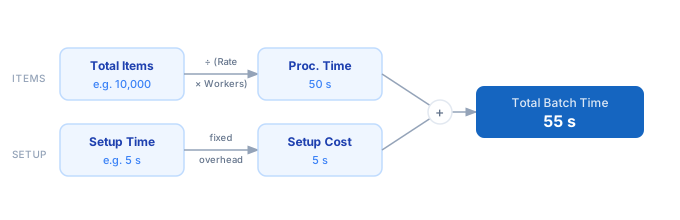
1. Enter the total number of items your job needs to process — rows, records, files, API requests, or any discrete unit. 2. Set the processing rate: how many items a single worker handles per second under production load. 3. Enter the number of parallel workers — threads, pods, Lambda functions, or machines running concurrently. 4. Add any fixed setup time in seconds: container cold start, DB connection pool creation, model loading, etc. 5. Read the total duration: processing time = (Items ÷ (Rate × Workers)), plus setup time. 6. Adjust the worker count up or down to hit a target completion window.
Formula
Total Time = (Total Items ÷ (Rate × Workers)) + Setup Time

Total Items  — number of records, files, or requests to process
Rate         — items processed per second per worker (measure on a sample)
Workers      — number of parallel workers running concurrently
Setup Time   — fixed overhead before processing begins (seconds)
Total Time   — end-to-end wall-clock duration in seconds
Example Batch Processing Time Calculations
Example 1 — Data pipeline: 1,000,000 rows, 4 workers
Total Items:  1,000,000
Rate:              50 items/s per worker
Workers:            4
Setup Time:        30 s

Effective throughput: 50 × 4    =    200 items/s
Processing:  1,000,000 ÷ 200   =  5,000 s
Total:          5,000 + 30     =  5,030 s  ≈  83.8 minutes
Example 2 — Image resize batch: 50,000 images, 8 workers
Total Items:     50,000
Rate:               5 items/s per worker
Workers:            8
Setup Time:        20 s

Effective throughput: 5 × 8     =     40 items/s
Processing:   50,000 ÷ 40      =  1,250 s
Total:         1,250 + 20      =  1,270 s  ≈  21.2 minutes
Example 3 — API ingestion: 200,000 requests, 20 workers
Total Items:    200,000
Rate:              10 items/s per worker
Workers:           20
Setup Time:         5 s

Effective throughput: 10 × 20   =    200 items/s
Processing:  200,000 ÷ 200     =  1,000 s
Total:         1,000 + 5       =  1,005 s  ≈  16.75 minutes
Tips to Reduce Batch Processing Time
- › Scale workers horizontally before optimising per-item throughput — doubling workers halves duration; doubling per-item rate also halves it, but horizontal scaling is usually cheaper in cloud environments.
- › Measure your actual items-per-second rate under production load using a small sample batch before extrapolating. Disk I/O and network latency cause real rates to differ significantly from theoretical maximums.
- › Minimise setup time by reusing connections and pre-loading shared resources. Container warm-up, DB connection pool creation, and model loading can each add tens of seconds of fixed overhead to every batch run.
- › For cloud batch jobs (AWS Batch, Kubernetes Jobs), use this calculator's output to hit a target completion window, then validate with a dry-run on 1% of your dataset before committing full compute.
- › Use the <a href="/calculators/worker-queue-throughput-calculator">Worker Queue Throughput Calculator</a> alongside this tool to verify your message queue can feed workers fast enough to sustain the target rate.
- › If processing time dominates setup time, focus optimisation there. If setup time is more than 10% of total time, consider batching small jobs into fewer larger runs to amortise the fixed cost.
Notes
- › Results are estimates and may vary based on actual usage.
- › Always validate against your production environment.