Message Queue Delay Calculator
API & BackendEnter your queue depth, consumer throughput, and per-message overheads to instantly calculate total end-to-end message delay. Works with RabbitMQ, Kafka, SQS, and any queue-based system.
Last updated: April 2026
This calculator is designed for real-world usage based on typical engineering scenarios and publicly available documentation.
A message queue delay calculator helps you understand how long a message will wait before a consumer processes it. The dominant factor is almost always queue wait time — the backlog of messages ahead of yours divided by how fast your consumers can process them. A queue depth of 1,000 messages with 100 consumers/sec means a 10-second wait before your message is even picked up. Engineers use this tool when sizing consumer fleets before launch, diagnosing SLA breaches caused by queue backlogs, or modelling the impact of adding more consumer instances. It applies equally to RabbitMQ queues, Kafka consumer groups, AWS SQS, Azure Service Bus, and any other message broker where lag is measurable. Beyond queue wait time, three smaller delays compound on every message: the time your consumer spends executing business logic per message, the network round-trip between producer and broker, and the cost of serializing and deserializing the payload. JSON serialization alone can add 1–5 ms per message; switching to Protocol Buffers or MessagePack can recover most of that. Use the calculator above to model different consumer throughput scenarios. Doubling your consumer instances roughly halves your queue wait time — the most impactful lever in any backlog incident.
How to Calculate Message Queue Delay
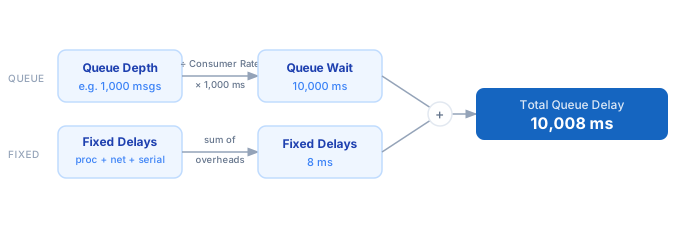
1. Enter the current queue depth — the number of messages ahead of yours waiting to be consumed. 2. Set consumer throughput in messages per second. Find this in your broker's management UI (RabbitMQ ack rate, Kafka consumer group lag metrics). 3. The calculator divides queue depth by consumer throughput and multiplies by 1,000 to get queue wait time in milliseconds. 4. Enter per-message processing time — how long your consumer spends executing business logic after dequeuing. 5. Enter network latency (producer→broker round-trip) and serialization overhead for your payload format. 6. Total delay is the sum of queue wait time plus all fixed per-message delays.
Formula
Total Delay (ms) = Queue Wait Time + Processing Time + Network Latency + Serialization Overhead

Queue Wait Time (ms)  = (Queue Depth ÷ Consumer Throughput) × 1,000
Queue Depth           — messages currently ahead in the queue
Consumer Throughput   — messages consumed per second (msg/s)
Processing Time       — execution time per message in consumer (ms)
Network Latency       — round-trip latency between producer and broker (ms)
Serialization         — time to serialize/deserialize message payload (ms)
Example Message Queue Delay Calculations
Example 1 — RabbitMQ with moderate backlog
Queue Depth:   500 msgs  ÷  50 msg/s  ×  1,000  =  10,000 ms  (queue wait)
Processing:     3 ms
Network:        1 ms
Serialization:  0.5 ms
                                                    ──────────────────
Total Delay:  10,004.5 ms  (~10 seconds end-to-end)
Example 2 — Kafka high-throughput consumer group
Queue Depth:  10,000 msgs  ÷  5,000 msg/s  ×  1,000  =  2,000 ms  (queue wait)
Processing:     2 ms
Network:        0.5 ms
Serialization:  0.2 ms
                                                    ──────────────────
Total Delay:  2,002.7 ms  (~2 seconds — fast at scale)
Example 3 — Background task queue (low-volume, slow consumers)
Queue Depth:   50 msgs  ÷  2 msg/s  ×  1,000  =  25,000 ms  (queue wait)
Processing:   500 ms  (heavy DB + API calls per task)
Network:        5 ms
Serialization:  2 ms
                                                    ──────────────────
Total Delay:  25,507 ms  (~25.5 seconds — consumer throughput is the bottleneck)
Tips to Reduce Message Queue Delay
- › Add more consumer instances to cut queue wait time proportionally — doubling consumers halves the wait. Use the <a href="/calculators/worker-queue-throughput-calculator">Worker Queue Throughput Calculator</a> to size your fleet before a launch.
- › Monitor queue depth as your primary SLA metric. A safe max depth is: Consumer Throughput (msg/s) × Max Acceptable Delay (s). Set alerts at 80% of this threshold.
- › Co-locate consumers with the broker in the same availability zone. Cross-AZ or cross-region network latency can add 5–50 ms per message — negligible at low volume but significant at scale.
- › Switch from JSON to a binary serialization format (Protocol Buffers, MessagePack, Avro). Binary formats typically serialize 3–10× faster and produce smaller payloads, reducing both serialization overhead and network transfer time.
- › Set consumer prefetch limits (e.g. <code>prefetch_count=1</code> in RabbitMQ) to prevent a slow consumer from holding a batch of messages without processing them, which inflates effective queue depth for other consumers.
- › Track p99 queue depth, not average — burst traffic causes spikes that violate SLAs even when the mean looks healthy. Pair with the <a href="/calculators/latency-budget-calculator">Latency Budget Calculator</a> to allocate delay budgets across your pipeline.
Notes
- › Results are estimates and may vary based on actual usage.
- › Always validate against your production environment.