API Response Time Estimator
PerformanceEstimate how long your API endpoint takes to respond by breaking response time into network latency, server processing, payload transfer, and middleware overhead. Built for backend engineers diagnosing slow endpoints and setting realistic SLO targets.
Last updated: April 2026
This calculator is designed for real-world usage based on typical engineering scenarios and publicly available documentation.
The API response time estimator breaks down the total round-trip time into four measurable components: network latency, server processing time, payload transfer time, and middleware overhead. Understanding where time is spent is the first step to reducing it. Network latency is the unavoidable cost of distance — a request from Europe to a US-East server adds 80–120 ms before a single line of server code runs. Server processing covers your database queries, business logic, and serialisation. Transfer time depends on payload size and bandwidth: a 500 KB JSON response over a 10 Mbps connection contributes 400 ms of transfer time alone. Middleware layers — authentication, logging, rate limiting, tracing — each add a small but compounding overhead per request. Use this tool when profiling an endpoint and identifying the dominant cost driver, when setting p99 SLO targets for a new service, or when evaluating whether a CDN, edge deployment, or response compression will move the needle. Backend engineers, SREs, and API platform teams use this to reason about latency budgets before committing to infrastructure changes.
How the API Response Time Estimator Works
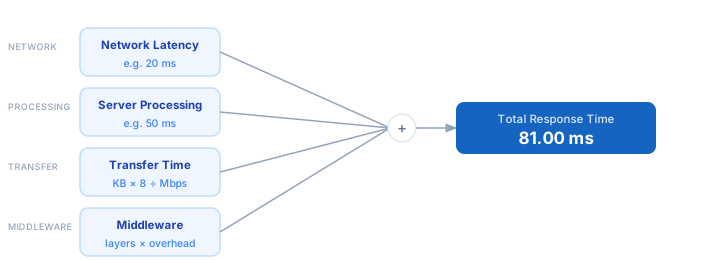
1. Enter the network round-trip latency in milliseconds — measure with ping or traceroute from the client region to your server region. 2. Enter your server processing time — the time your code takes to handle the request, including database queries. Profile with APM tools or add timing logs. 3. Enter the response payload size in kilobytes — check your API responses with browser DevTools or curl --write-out. 4. Enter the available bandwidth in Mbps — use the client's connection speed or your CDN throughput figures. 5. Enter the number of middleware layers and the average overhead per layer — check your framework's middleware timing logs. 6. The calculator sums all four components to give you the total estimated response time.
Formula
Total Response Time (ms) =
  Network Latency
  + Server Processing Time
  + Transfer Time
  + Middleware Total

Transfer Time (ms)  = (Payload Size in KB × 8) ÷ Bandwidth in Mbps
Middleware Total (ms) = Middleware Layers × Overhead per Layer

Network Latency     — round-trip time from client to server (ms)
Server Processing   — time for your code to handle and respond (ms)
Payload Size        — size of the HTTP response body (KB)
Bandwidth           — effective throughput between client and server (Mbps)
Middleware Layers   — count of interceptors, guards, or middleware in the request pipeline
Overhead per Layer  — average processing time added by each middleware (ms)
Example API Response Time Calculations
Example 1 — REST JSON endpoint, same-region client
Network latency:      5 ms   (same AWS region)
Server processing:   30 ms   (DB query + serialisation)
Payload:             50 KB   over 1,000 Mbps LAN  →  0.40 ms transfer
Middleware:          3 layers × 2 ms               →  6 ms
                                                   ──────────────
Total: 5 + 30 + 0.40 + 6 = 41.4 ms
Example 2 — Mobile app calling a cloud API over 4G
Network latency:     50 ms   (4G round-trip to EU-West)
Server processing:   80 ms   (complex aggregation query)
Payload:            200 KB   over 20 Mbps 4G         →  80 ms transfer
Middleware:          5 layers × 5 ms                 →  25 ms
                                                     ──────────────
Total: 50 + 80 + 80 + 25 = 235 ms
Example 3 — Cross-continent API call with large response
Network latency:    120 ms   (US-East → Asia-Pacific)
Server processing:   40 ms   (cache hit, fast path)
Payload:            500 KB   over 10 Mbps international link  →  400 ms
Middleware:          4 layers × 8 ms                          →   32 ms
                                                              ──────────────
Total: 120 + 40 + 400 + 32 = 592 ms   →  compress payload to cut 300+ ms
Tips to Reduce API Response Time
- › Compress response payloads with gzip or Brotli — a 500 KB JSON response compresses to ~60 KB, cutting transfer time by up to 88% with negligible CPU cost.
- › Deploy your API in the region closest to your users. Cross-continental network latency of 120–200 ms cannot be optimised in code — proximity is the only fix.
- › Cache expensive query results at the application layer. A cache hit that skips a 100 ms database round-trip is the fastest code path of all.
- › Audit your middleware pipeline. Each layer adds overhead on every request — remove logging, tracing, or validation middleware that is not required for the specific route.
- › Use HTTP/2 or HTTP/3 for clients that make multiple concurrent API calls — multiplexing eliminates per-request connection overhead and reduces total latency.
- › Profile under realistic load. Response time often degrades non-linearly under concurrency — a 30 ms p50 can become a 500 ms p99 when the database connection pool is saturated.
Notes
- › Results are estimates and may vary based on actual usage.
- › Always validate against your production environment.
Frequently Asked Questions
What is a good API response time target? +
What is the difference between latency and response time? +
How do I measure my API's actual response time? +
curl --write-out "%{time_total}" for quick terminal measurements. For structured profiling, use tools like k6, Apache JMeter, or Datadog APM. Browser DevTools network panel shows per-request breakdown including DNS, TCP, TLS, waiting (TTFB), and download phases. Always measure from the client region your users actually connect from.