API Pagination Limit Calculator
API & BackendEnter your total record count, page size, and rate limit to instantly calculate how many API requests you need and how long a full data sync will take.
Last updated: April 2026
This calculator is designed for real-world usage based on typical engineering scenarios and publicly available documentation.
The API pagination limit calculator helps you plan how many requests a paginated API endpoint will require to retrieve a full dataset. Whether you are syncing a CRM, exporting database records, or hydrating a cache from a third-party service, underestimating request volume is a common source of budget overruns and rate-limit errors. Most REST APIs enforce a maximum page size — Stripe caps at 100 objects per request, GitHub at 100 items, Salesforce at 2,000 records. Multiply that ceiling by your record count and rate limit and you get a clear picture of the minimum time and request budget you need to allocate. Backend engineers use this calculator to size background job timeouts, set worker pool concurrency, and verify that a nightly sync finishes before the next run begins. It is equally useful for capacity planning when switching from cursor-based to offset-based pagination, where deeper pages are progressively slower. The formula is simple but the implications compound quickly at scale. A 1-million-record export with a page size of 100 and a 10 req/s rate limit takes over 27 minutes — knowing that in advance prevents surprise timeouts and helps you choose the right async architecture from the start.
How to Calculate API Pagination Limit and Fetch Time
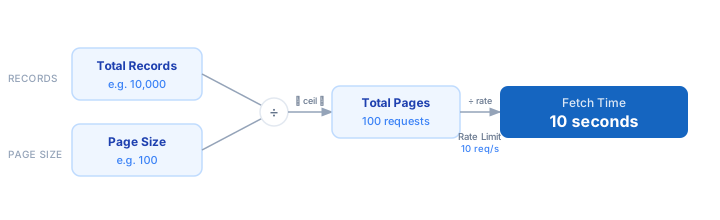
1. Determine your total record count — query your database or use the API's total_count field in the first response. 2. Find the maximum page size your API allows (check the docs for a "limit" or "per_page" cap). 3. Divide total records by page size and round up — that is your minimum request count. 4. Enter your API's rate limit in requests per second (convert from "per minute" by dividing by 60). 5. Divide total pages by rate limit to get total fetch time in seconds. 6. Add a buffer of 10–20% for retries, network jitter, and token refresh requests.
Formula
Total Pages   = ⌈ Total Records ÷ Page Size ⌉
Fetch Time    = Total Pages ÷ Rate Limit   (seconds)

Total Records — number of objects you need to retrieve
Page Size     — records returned per API request (your "limit" param)
Rate Limit    — maximum requests per second your API key allows
Fetch Time    — minimum wall-clock seconds to retrieve all records
Example API Pagination Calculations
Example 1 — Stripe customer export (100 records/page, 100 req/s)
Total records:  50,000 customers
Page size:     100  (Stripe max)
Rate limit:    100 req/s

Total pages  = ⌈ 50,000 ÷ 100 ⌉ = 500 requests
Fetch time   = 500 ÷ 100       = 5 seconds

→ A 50k-customer sync completes in 5 seconds — fits easily in a webhook handler timeout.
Example 2 — GitHub issues export (100 items/page, 10 req/min)
Total records:  8,400 issues
Page size:     100  (GitHub max)
Rate limit:    10 req/min  →  0.167 req/s

Total pages  = ⌈ 8,400 ÷ 100 ⌉ = 84 requests
Fetch time   = 84 ÷ 0.167       ≈ 503 seconds  (~8.4 minutes)

→ Must run as a background job; too slow for a synchronous HTTP response.
Example 3 — Internal analytics API (1,000 rows/page, 5 req/s)
Total records:  2,000,000 rows
Page size:     1,000
Rate limit:    5 req/s

Total pages  = ⌈ 2,000,000 ÷ 1,000 ⌉ = 2,000 requests
Fetch time   = 2,000 ÷ 5               = 400 seconds  (~6.7 minutes)

→ Increase page size to 5,000 rows → 400 requests → 80 seconds saved per run.
Tips to Optimise Paginated API Calls
- › Always use the maximum allowed page size. Fetching 1,000 records in one request is identical in rate-limit cost to fetching 10 records — maximising page size minimises total requests.
- › Prefer cursor-based pagination over offset pagination for large datasets. Offset queries get slower as the offset grows; cursors maintain constant response time regardless of depth.
- › Parallelise independent pagination streams. If the API allows it, fan out multiple concurrent requests to different data partitions (e.g., by date range or shard key) and merge results.
- › Cache the total_count from the first response. Most APIs return it on page 1 — store it so subsequent logic can pre-allocate arrays and show accurate progress bars.
- › Budget 10–20% extra requests for retries. Rate-limited requests return 429 errors; your fetch loop must handle these with exponential backoff, adding to actual request count. Use the <a href="/calculators/retry-backoff-calculator">Retry Backoff Calculator</a> to size your retry window.
- › Set job timeouts based on calculated fetch time plus a safety margin. If your sync takes 8 minutes, set your worker timeout to at least 12 minutes to avoid silent failures.
Notes
- › Results are estimates and may vary based on actual usage.
- › Always validate against your production environment.