Pagination Performance Calculator
Data & FormatsEnter your dataset size, page size, and target page number to instantly compare offset vs cursor pagination query times. See exactly how much slower deep pages get with OFFSET.
Last updated: April 2026
This calculator is designed for real-world usage based on typical engineering scenarios and publicly available documentation.
The pagination performance calculator shows you how much slower an offset-based pagination query gets as page number increases — a critical insight for any application that pages through large database tables. With offset pagination (LIMIT n OFFSET m), the database engine must scan and discard every row before the target page. Page 500 with a page size of 25 forces the DB to scan 12,475 rows just to return 25. Cursor-based (keyset) pagination avoids this entirely by seeking directly to the last-seen row ID, keeping query time constant regardless of depth. This calculator is used by backend engineers, DBAs, and architects diagnosing slow API list endpoints, planning index strategies, or making the case for migrating from OFFSET to cursor pagination. Use the slowdown factor output to quantify the performance regression before it hits production.
How to Calculate Pagination Performance
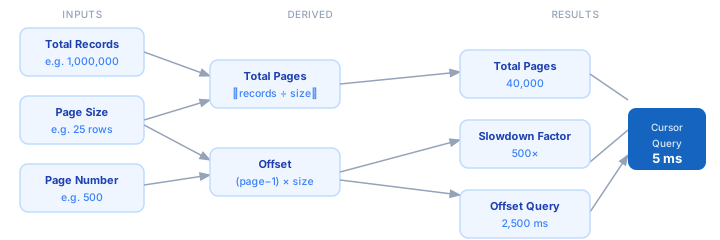
1. Enter the total number of records in the table or result set you are paginating. 2. Set the page size — how many rows are returned per API or UI page. 3. Enter the target page number you want to analyze (e.g. page 500). 4. Enter the measured query time for page 1 in milliseconds — this is your baseline. 5. The calculator derives the offset (rows skipped), the estimated offset query time, and the cursor query time. 6. Compare the slowdown factor to decide whether keyset pagination is worth the migration cost.
Formula
Offset          = (Page − 1) × Page Size
Total Pages     = ⌈Total Records ÷ Page Size⌉
Rows on Page    = min(Page Size, Total Records − Offset)

Slowdown Factor = (Offset + Page Size) ÷ Page Size
                = Page Number  (for full pages)

Offset Query Time  = Page 1 Time × Slowdown Factor
Cursor Query Time  = Page 1 Time  (constant — no offset scanned)

Offset          — rows the DB scans and discards before the target page
Slowdown Factor — how many times slower the offset query is vs page 1
Example Pagination Performance Calculations
Example 1 — Admin list at page 500 (25 rows/page)
Total records: 1,000,000  |  Page size: 25  |  Target page: 500

Offset         = (500 − 1) × 25 = 12,475 rows scanned and discarded
Total pages    = ⌈1,000,000 ÷ 25⌉ = 40,000
Slowdown       = (12,475 + 25) ÷ 25 = 500×

Page 1 query:  5 ms
Offset query:  5 × 500 = 2,500 ms  ← 2.5 seconds per page
Cursor query:  5 ms   ← unchanged
Example 2 — E-commerce search results at page 20 (50 rows/page)
Total records: 200,000  |  Page size: 50  |  Target page: 20

Offset         = (20 − 1) × 50 = 950 rows scanned and discarded
Total pages    = ⌈200,000 ÷ 50⌉ = 4,000
Slowdown       = (950 + 50) ÷ 50 = 20×

Page 1 query:  8 ms
Offset query:  8 × 20 = 160 ms  ← noticeable latency
Cursor query:  8 ms   ← unchanged
Example 3 — Audit log export at page 10,000 (100 rows/page)
Total records: 5,000,000  |  Page size: 100  |  Target page: 10,000

Offset         = (10,000 − 1) × 100 = 999,900 rows scanned and discarded
Total pages    = ⌈5,000,000 ÷ 100⌉ = 50,000
Slowdown       = (999,900 + 100) ÷ 100 = 10,000×

Page 1 query:  3 ms
Offset query:  3 × 10,000 = 30,000 ms  ← 30 seconds, query will time out
Cursor query:  3 ms   ← safe to use at any depth
Tips to Improve Pagination Performance
- › Switch to keyset (cursor) pagination for any list endpoint that users or jobs page beyond page 10 — offset cost grows linearly with page number and will eventually time out.
- › Add a covering index on the sort column (e.g. <code>created_at</code>, <code>id</code>) so the DB can satisfy the pagination query from the index alone without touching the heap.
- › Cap the maximum page size at a sensible limit (e.g. 100–200 rows). Large page sizes multiply both the offset scan cost and response payload size.
- › Cache the total count separately — <code>COUNT(*)</code> on large tables is expensive. Store an approximate count in a materialized view or stats table and refresh it periodically.
- › For read-heavy paginated APIs, use a read replica. Offset scans are CPU-intensive and can starve write queries on the primary if run frequently.
- › Expose a <code>next_cursor</code> token in your API response instead of exposing raw page numbers. This forces clients into cursor pagination and prevents deep-offset abuse.
Notes
- › Results are estimates and may vary based on actual usage.
- › Always validate against your production environment.
Frequently Asked Questions
Why does offset pagination get slower on later pages? +
LIMIT n OFFSET m, the database engine must read and discard every row before the target page — it cannot skip ahead. Page 500 with a page size of 25 forces the DB to process 12,475 rows to return 25. No index can eliminate this scan; the engine must traverse the index in order from the start to reach the offset position. What is cursor-based (keyset) pagination and how does it stay fast? +
WHERE id > last_seen_id condition instead of an offset. The database index seeks directly to the cursor position in O(log n) time and returns the next page — no rows are discarded. Query time stays constant regardless of how deep into the result set you are, making it the correct choice for any large dataset. When is offset pagination acceptable? +
What index should I add to speed up paginated queries? +
WHERE status = 'active' ORDER BY created_at DESC, index (status, created_at DESC). A covering index allows the database to satisfy the query entirely from the index without touching the main table, significantly reducing I/O even for offset queries. Does this calculator work for Elasticsearch and NoSQL databases? +
from/size, MongoDB skip/limit, and DynamoDB scan with offset all exhibit the same linear degradation. Elasticsearch's search_after, MongoDB's range queries, and DynamoDB's ExclusiveStartKey are the keyset equivalents. Use the slowdown factor to quantify the urgency of migrating.