Session Size Calculator
API & BackendEstimate the total token size of an LLM API session and see how much of your context window it consumes. Built for developers sizing chat sessions, agents, and multi-turn API calls.
Last updated: April 2026
This calculator is designed for real-world usage based on typical engineering scenarios and publicly available documentation.
A session size calculator helps you measure the cumulative token footprint of a multi-turn LLM conversation before it hits the context window limit. Because most chat APIs send the full conversation history on every request, token counts grow linearly with each turn — making early estimation critical for long-running sessions. Developers building chatbots, AI agents, and assistants need to know when a session will overflow the model's context window. Overflows cause silent truncation (the model forgets earlier messages), unexpected API errors, or forced session resets that break user experience. This calculator shows you exactly how many turns a session can sustain before that happens. Session token budgets vary widely by use case. A simple Q&A bot with a short system prompt and terse messages can run hundreds of turns. A complex agent with a large tool manifest and verbose reasoning steps may exhaust a 128k context window in fewer than 20 turns. Use this tool to design the right strategy — truncation, summarisation, or model selection — before you hit production limits. The formula applies to any provider using context-window billing: OpenAI GPT-4o (128k), Anthropic Claude 3.5 (200k), Google Gemini 1.5 Pro (1M), and others. Plug in that model's context window size and your typical message lengths to get an accurate capacity estimate.
How to Calculate Session Size in Tokens
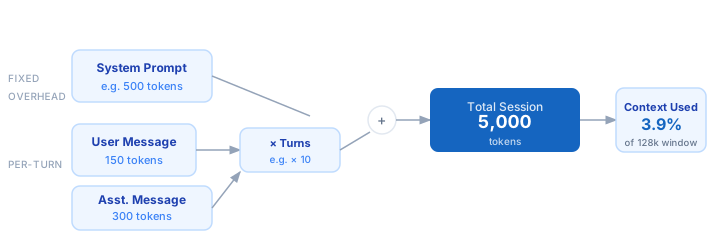
1. Count your system prompt tokens — the fixed overhead present on every API call in the session. 2. Estimate the average user message length in tokens for your use case (short questions vs. long document pastes). 3. Estimate the average assistant response length in tokens. 4. Enter the number of conversation turns you want to support. 5. The calculator sums all tokens: system prompt + (turns × (user tokens + assistant tokens)). 6. Compare the total against your model's context window to see usage percentage and turns before overflow.
Formula
Total Session Tokens = System Prompt Tokens
                      + Turns × (Avg User Tokens + Avg Assistant Tokens)

Context Window Usage (%) = (Total Session Tokens ÷ Context Window Size) × 100

Max Turns Before Overflow = floor((Context Window Size − System Prompt Tokens)
                                   ÷ (Avg User Tokens + Avg Assistant Tokens))

System Prompt Tokens  — fixed token count sent on every call (instructions, tools)
Turns                 — number of user+assistant message pairs in the session
Avg User Tokens       — mean token count of each user message
Avg Assistant Tokens  — mean token count of each assistant response
Context Window Size   — model's maximum context in tokens (e.g. 128,000 for GPT-4o)
Example Session Size Calculations
Example 1 — Customer support chatbot (GPT-4o, 128k context)
System prompt:       500 tokens
Turns:                10
Avg user message:    150 tokens
Avg assistant reply: 300 tokens

Total = 500 + 10 × (150 + 300)
      = 500 + 4,500
      = 5,000 tokens

Context usage: 5,000 ÷ 128,000 = 3.9%
Max turns before overflow: floor((128,000 − 500) ÷ 450) = 283 turns
Example 2 — AI coding agent with large tool manifest (GPT-4o, 128k context)
System prompt:     8,000 tokens  (tools + instructions)
Turns:                20
Avg user message:    800 tokens  (code pastes)
Avg assistant reply: 1,200 tokens (patches + explanations)

Total = 8,000 + 20 × (800 + 1,200)
      = 8,000 + 40,000
      = 48,000 tokens

Context usage: 48,000 ÷ 128,000 = 37.5%
Max turns before overflow: floor((128,000 − 8,000) ÷ 2,000) = 60 turns
Example 3 — Long-running research agent (Claude 3.5, 200k context)
System prompt:     3,000 tokens
Turns:               100
Avg user message:    500 tokens
Avg assistant reply: 1,500 tokens

Total = 3,000 + 100 × (500 + 1,500)
      = 3,000 + 200,000
      = 203,000 tokens  ← OVERFLOW

Context usage: 203,000 ÷ 200,000 = 101.5%  ← exceeds limit
Max turns before overflow: floor((200,000 − 3,000) ÷ 2,000) = 98 turns
Action: reduce to 98 turns or apply rolling summarisation at turn 80
Tips to Manage Session Token Size
- › Summarise mid-session. When the session reaches 70–80% of the context window, replace the oldest N turns with a compressed summary. This preserves continuity without truncating the system prompt or recent context.
- › Audit your system prompt regularly. A bloated system prompt costs tokens on every single call. Trim instructions that repeat themselves, remove unused tool definitions, and store long reference material out of the prompt (e.g. via RAG retrieval).
- › Choose the right context window for the job. If your sessions routinely exceed 50k tokens, evaluate Claude 3.5 (200k) or Gemini 1.5 Pro (1M) before paying for repeated context refills with a smaller-window model.
- › Use streaming and early stopping. If assistant responses are verbose, stream the output and stop generation once you have the needed information — shorter actual responses reduce the token growth rate per turn.
- › Track tokens in the API response. Every major LLM API returns a <code>usage</code> field with exact input and output counts. Log these per turn to measure real session growth rather than estimating.
- › Apply per-user session limits. Set a hard limit (e.g. 50 turns or 80% context usage) in your application layer and prompt the user to start a new session. This prevents surprise overflow errors and controls per-session cost. Use the <a href="/calculators/openai-cost-calculator">OpenAI Cost Calculator</a> to model the cost impact.
Notes
- › Results are estimates and may vary based on actual usage.
- › Always validate against your production environment.
Frequently Asked Questions
What happens when a session exceeds the context window? +
Does the context window reset between API calls in the same session? +
How do I count tokens in a system prompt or message? +
anthropic.messages.count_tokens method returns an exact count. You can also read the usage.input_tokens field in any API response to see what was charged for a given call. What is a typical system prompt token count? +
How do I handle sessions that need to run indefinitely? +
ConversationSummaryBufferMemory or a custom summarisation step automate this. Pair this calculator with the OpenAI Cost Calculator to estimate the added cost of periodic summarisation calls.