Payload Size Calculator
API & BackendInstantly estimate the byte size of your API request or response payload. Enter your average record size and record count to see total payload, gzip estimate, and daily bandwidth at a glance.
Last updated: April 2026
This calculator is designed for real-world usage based on typical engineering scenarios and publicly available documentation.
The payload size calculator helps API designers and backend engineers estimate how large their request and response bodies will be before deploying to production. Whether you're building a REST endpoint, a GraphQL query, or a batch-processing job, knowing your payload size upfront prevents nasty surprises — timeouts, mobile data overruns, and unexpected bandwidth bills. Most API frameworks have default body size limits (Express defaults to 100 KB; nginx to 1 MB). Exceeding them silently drops requests or returns cryptic 413 errors. Use this calculator during design to check whether your batch size is safe under your server's configured limit. Compression matters at scale. JSON compresses roughly 70% with gzip, so a 1 MB raw payload becomes ~300 KB on the wire. The calculator shows both figures so you can decide whether enabling Content-Encoding: gzip is worth the CPU cost for your use case. The daily volume figure helps you size your API gateway egress budget, estimate CDN costs, and set meaningful rate limits. Pair it with the <a href="/calculators/bandwidth-cost-calculator">Bandwidth Cost Calculator</a> to translate bytes into dollars.
How to Calculate API Payload Size
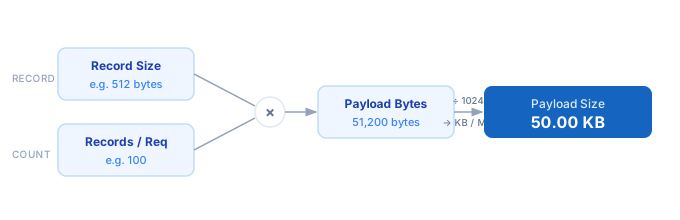
1. Estimate your average record size in bytes — serialize a typical JSON object and check its byte length with Buffer.byteLength() (Node.js) or len(json.dumps(obj).encode()) (Python). 2. Enter the number of records included in a single request or response (e.g. a pagination page size of 100). 3. The calculator multiplies record size × record count to get raw payload bytes. 4. Gzip estimate applies a 0.30 multiplier — typical for JSON payloads with repeated keys and string values. 5. Daily volume multiplies per-request payload by your expected request count, giving a bandwidth planning figure. 6. Adjust record size or count until the payload fits safely under your server and gateway body-size limits.
Formula
Payload Bytes    = Record Size (bytes) × Records per Request
Gzip Estimate    = Payload Bytes × 0.30   (≈ 70% compression ratio for JSON)
Daily Volume     = Payload Bytes × Requests per Day
Monthly Volume   = Daily Volume × 30

Record Size      — serialised byte length of one JSON object (keys + values)
Records/Request  — items in a single API response or batch payload
Requests/Day     — expected API calls per day for bandwidth planning
Example Payload Size Calculations
Example 1 — Paginated REST endpoint (50 records)
Record size:       256 bytes (small user object: id, name, email, role)
Records/request:   50
Raw payload:       256 × 50 = 12,800 bytes  →  12.5 KB
Gzip estimate:     12,800 × 0.30 = 3,840 bytes  →  3.75 KB
At 5,000 req/day:  64 MB/day raw · 19.2 MB/day compressed
Example 2 — Large batch export (1,000 records)
Record size:       1,024 bytes (order object: ~20 fields, nested address)
Records/request:   1,000
Raw payload:       1,024 × 1,000 = 1,048,576 bytes  →  1.00 MB
Gzip estimate:     1,048,576 × 0.30 = 314,573 bytes  →  307 KB
Note: exceeds Express default 100 KB limit — must set bodyParser limit or stream.
Example 3 — High-frequency microservice (10 records)
Record size:       128 bytes (event: timestamp, type, user_id, value)
Records/request:   10
Raw payload:       128 × 10 = 1,280 bytes  →  1.25 KB
Gzip estimate:     1,280 × 0.30 = 384 bytes  →  0.38 KB (compression barely worth it)
At 50,000 req/day: 64 MB/day  →  ~1.9 GB/month
Tips to Keep API Payloads Small
- › Measure before you guess — serialize a real object in your language and call the byte-length function. Guessed sizes are almost always off by 2–5×.
- › Use field projection (sparse fieldsets) so clients only receive the fields they need. GraphQL does this by design; REST can use <code>?fields=id,name,email</code> query params.
- › Enable gzip/brotli compression at the reverse proxy layer (nginx, Caddy) rather than in application code — it's faster and requires zero code changes.
- › Paginate aggressively. A page size of 20–50 records is usually enough for UI rendering and keeps p99 response times predictable under load.
- › Replace repeated string enums with integer codes in high-frequency payloads. "status":"completed" (21 bytes) vs "s":3 (5 bytes) — a 4× saving across millions of records.
- › Use <a href="/calculators/bandwidth-cost-calculator">Bandwidth Cost Calculator</a> to convert your daily volume estimate into a dollar amount and decide whether compression investment pays off.
Notes
- › Results are estimates and may vary based on actual usage.
- › Always validate against your production environment.
Frequently Asked Questions
What is a good maximum size for an API payload? +
How do I measure the actual byte size of a JSON object? +
Buffer.byteLength(JSON.stringify(obj)). In Python use len(json.dumps(obj).encode("utf-8")). In the browser use new TextEncoder().encode(JSON.stringify(obj)).length. These all give UTF-8 byte counts, which is what HTTP Content-Length reports. Non-ASCII characters count as 2–4 bytes each. How accurate is the 70% gzip compression estimate? +
gzip -9 on a sample payload for a precise figure specific to your schema.