Cache Hit Rate Calculator
PerformanceEnter your total requests and cache hits to instantly see your hit rate, miss rate, and how many requests are reaching your origin server.
Last updated: April 2026
This calculator is designed for real-world usage based on typical engineering scenarios and publicly available documentation.
The cache hit rate calculator tells you what percentage of requests are served from cache versus forwarded to your origin. A cache hit rate of 90% means only 1 in 10 requests hits your database or upstream service — that ratio directly determines your infrastructure cost and response latency. Engineers use this metric to validate CDN configuration (Cloudflare, Fastly, CloudFront), tune Redis or Memcached TTLs, and identify under-caching patterns in API or database layers. A sudden drop in hit rate is often the first signal of a misconfigured cache key, a new query pattern bypassing the cache, or an expiry window set too short. The formula is straightforward: divide cache hits by total requests and multiply by 100. What matters is how you instrument and act on it. A hit rate below 80% in a CDN usually points to low cache-control TTLs or too many unique URLs. A hit rate below 50% in an application cache often means cache keys are too granular or invalidation is too aggressive. This calculator works for any cache layer — CDN edge caches, in-process memory caches, distributed key-value stores, HTTP reverse proxies, and browser caches. Paste in your access log counts or APM dashboard numbers to get an instant read.
How to Calculate Cache Hit Rate
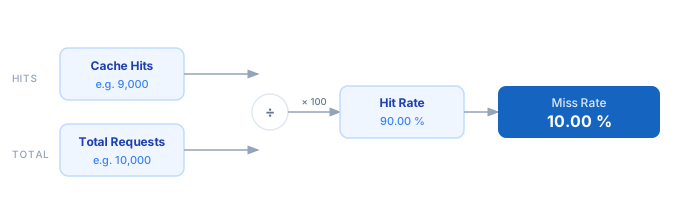
1. Count your total requests over a fixed time window — pull this from your CDN dashboard, APM tool, or access logs. 2. Count the requests served from cache (cache hits) over the same window. 3. Divide cache hits by total requests to get the hit ratio. 4. Multiply by 100 to express it as a percentage. 5. Subtract the hit rate from 100 to get the miss rate — this is the fraction of requests forwarded to your origin.
Formula
Cache Hit Rate (%) = (Cache Hits ÷ Total Requests) × 100

Cache Miss Rate (%) = 100 − Cache Hit Rate

Requests to Origin = Total Requests − Cache Hits

Cache Hits     — requests served directly from cache without touching the origin
Total Requests — all incoming requests including hits and misses
Requests to Origin — misses that are forwarded to the upstream server or database
Example Cache Hit Rate Calculations
Example 1 — CDN serving a marketing site
Total Requests:  100,000 / hour
Cache Hits:       94,000 / hour

Hit Rate  = (94,000 ÷ 100,000) × 100 = 94.00%
Miss Rate = 100 − 94.00             =  6.00%
Origin load: 6,000 req/hr  →  only 1.67 req/sec reach the origin server
Example 2 — Redis cache for an API endpoint
Total Requests:  50,000 / hour
Cache Hits:       32,000 / hour

Hit Rate  = (32,000 ÷ 50,000) × 100 = 64.00%
Miss Rate = 100 − 64.00             = 36.00%
Origin load: 18,000 req/hr  →  indicates TTL is too short or cache keys are too specific
Example 3 — Database query cache after tuning
Total Queries:   200,000 / hour
Cache Hits:      188,000 / hour

Hit Rate  = (188,000 ÷ 200,000) × 100 = 94.00%
Miss Rate = 100 − 94.00               =  6.00%
DB queries avoided: 188,000/hr  →  ~94% reduction in database read load
Tips to Improve Your Cache Hit Rate
- › Set long cache TTLs for static assets and use content-addressed filenames (e.g. <code>main.abc123.js</code>) so you can cache indefinitely without serving stale files.
- › Normalise your cache keys. Strip tracking parameters (<code>utm_source</code>, <code>fbclid</code>) from URLs before caching — each variant creates a separate cache entry and tanks your hit rate.
- › Warm your cache on deploy. Pre-populate high-traffic keys immediately after a cache flush or deployment to avoid a cold-start miss storm reaching your origin.
- › Use <code>stale-while-revalidate</code> in HTTP cache headers to serve stale content while a background refresh happens — this keeps hit rates high during cache expiry windows.
- › Monitor hit rate by route, not just globally. A single high-traffic endpoint with a 20% hit rate can drag your overall average down while everything else is healthy.
- › For Redis and Memcached, use the <code>INFO stats</code> command to pull <code>keyspace_hits</code> and <code>keyspace_misses</code> — these give you per-instance hit rates without needing an APM tool.
Notes
- › Results are estimates and may vary based on actual usage.
- › Always validate against your production environment.
Frequently Asked Questions
What is a good cache hit rate? +
How do I measure cache hits and misses in production? +
INFO stats and read keyspace_hits and keyspace_misses. For Nginx, log the $upstream_cache_status variable. For browser caches, Chrome DevTools Network tab shows "from cache" vs "from network" for each request.