SQL Query Cost Estimator
Data & FormatsEnter the data scanned per query and your service's per-TB price to get an instant cost estimate. Works with BigQuery, Athena, Redshift Spectrum, and any per-TB-scan billing model.
Last updated: April 2026
This calculator is designed for real-world usage based on typical engineering scenarios and publicly available documentation.
The SQL Query Cost Estimator helps data engineers, analysts, and FinOps teams forecast database spend before it appears on their cloud bill. Services like BigQuery, Amazon Athena, and Redshift Spectrum charge per terabyte of data scanned — meaning a single unoptimized query can cost hundreds of dollars at scale. The per-TB model makes costs highly variable: a query scanning 10 GB costs roughly $0.05 on BigQuery, while the same logical query running against an unpartitioned 10 TB table costs $50. Understanding this relationship is essential for any team running analytical workloads on cloud data warehouses. Use this calculator before promoting queries to production, when designing table schemas, or when auditing monthly BigQuery or Athena invoices. It works for any service using per-TB scan pricing — plug in your provider's rate and the formula is identical across platforms. For recurring workloads, multiply cost per query by your expected daily query volume to project monthly spend. Partitioning, clustering, and columnar formats like Parquet typically reduce data scanned by 50–99%, making them the highest-leverage cost optimisations available.
How to Use the SQL Query Cost Estimator
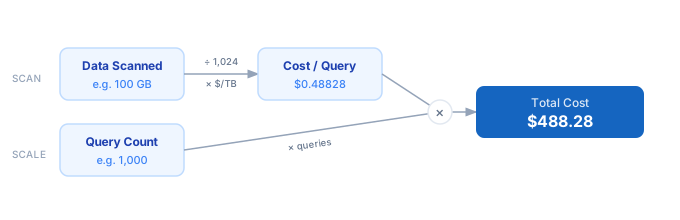
1. Find your cloud SQL service's per-TB scan price — BigQuery on-demand and Athena both charge $5.00/TB; Redshift Spectrum charges $5.00/TB for external queries. 2. Run a representative sample query and note the bytes processed shown in the query details panel, INFORMATION_SCHEMA.JOBS, or the Athena query history. 3. Convert bytes to gigabytes: divide by 1,073,741,824 (or read the GB figure directly from the console). 4. Enter the GB scanned per query and the price per TB into the calculator above. 5. Enter the number of queries you run per day, week, or month to project total cost. 6. The calculator applies (GB ÷ 1,024) × $/TB × query count — adjust inputs to model optimisation scenarios like partitioning or column pruning.
Formula
Total Cost = (Data Scanned GB ÷ 1,024) × Price per TB × Query Count

Data Scanned  — volume of data read per query, in gigabytes (GB)
Price per TB  — cost per terabyte scanned (e.g. $5.00 for BigQuery on-demand)
Query Count   — number of queries in the projection window

Cost per Query = (Data Scanned GB ÷ 1,024) × Price per TB
Total Cost     = Cost per Query × Query Count
Example SQL Query Cost Calculations
Example 1 — BigQuery dashboard query (daily run)
Data scanned:  100 GB  ÷ 1,024 = 0.097656 TB
Price:         0.097656 TB × $5.00/TB = $0.488281 per query
Query count:   30 runs/day × 30 days  = 900 queries/month
                                        ─────────────────────
Monthly cost:  $0.488281 × 900        = $439.45/month
Example 2 — Athena log analysis on unpartitioned table (before optimisation)
Data scanned:  500 GB  ÷ 1,024 = 0.488281 TB
Price:         0.488281 TB × $5.00/TB = $2.441406 per query
Query count:   100 queries/day × 30 days = 3,000 queries/month
                                        ─────────────────────
Monthly cost:  $2.441406 × 3,000      = $7,324.22/month
Example 3 — Same Athena query after adding date partitions (99% reduction)
Data scanned:  5 GB    ÷ 1,024 = 0.004883 TB
Price:         0.004883 TB × $5.00/TB = $0.024414 per query
Query count:   3,000 queries/month (unchanged)
                                        ─────────────────────
Monthly cost:  $0.024414 × 3,000      = $73.24/month   (vs $7,324 before — 100× cheaper)
SQL Query Pricing by Cloud Service
| Model | Input / 1M tokens | Output / 1M tokens |
|---|---|---|
| BigQuery (on-demand) | $5.00/TB | — |
| Amazon Athena | $5.00/TB | — |
| Redshift Spectrum | $5.00/TB | — |
| Azure Synapse Serverless | $5.00/TB | — |
| BigQuery (flat-rate) | Fixed | — |
| Snowflake | Compute | — |
Prices are approximate. Verify on your provider's pricing page before budgeting.
Tips to Reduce SQL Query Scan Costs
- › Partition your tables by date or a high-cardinality filter column. A date-partitioned BigQuery table lets a query scanning one day's data skip the remaining 364 days — reducing scanned bytes and cost by up to 99%.
- › Use column pruning: SELECT only the columns you need. BigQuery and Athena use columnar storage (Capacitor / Parquet), so selecting 3 of 50 columns scans roughly 6% of the table data.
- › Convert raw CSV or JSON tables to Parquet or ORC. Columnar compression typically reduces data size by 5–10×, cutting scan costs by the same factor with no query changes.
- › Cache results for repeated queries. BigQuery caches identical query results for 24 hours at no charge — structure dashboards to re-use cached results rather than re-scanning on every page load.
- › Set per-query or per-user byte budgets. BigQuery supports <code>maximumBytesBilled</code> on queries and project-level quotas to prevent runaway scans from surprise bills.
- › Use the <code>INFORMATION_SCHEMA.JOBS</code> view (BigQuery) or Athena query history to identify your top-10 most expensive queries by bytes scanned — these are the highest-priority optimisation targets.
Notes
- › Results are estimates and may vary based on actual usage.
- › Always validate against your production environment.
Frequently Asked Questions
How does BigQuery charge for SQL queries? +
Does this SQL query cost estimator work for Amazon Athena? +
How do I find out how many GB my BigQuery query scans? +
dryRun: true in the API) to get the byte count without executing the query. After execution, check the "Bytes processed" field in the query details panel or query INFORMATION_SCHEMA.JOBS for the total_bytes_billed column. What is the cheapest way to run analytical SQL queries in the cloud? +
How does partitioning reduce SQL query costs? +
WHERE date = '2026-04-14'), the engine reads only that partition and skips the rest. A table with 3 years of daily data has 1,095 partitions; a single-day query scans 1/1,095th of the total data, reducing cost by over 99%.