Leaky Bucket Rate Calculator
API & BackendInstantly calculate effective throughput, request drop rate, and bucket fill time for leaky bucket rate limiting. Designed for API engineers sizing their rate-limit configuration.
Last updated: April 2026
This calculator is designed for real-world usage based on typical engineering scenarios and publicly available documentation.
The leaky bucket rate calculator helps you model the leaky bucket algorithm — one of the most widely used traffic-shaping mechanisms in API gateways, reverse proxies, and network infrastructure. Enter your incoming request rate, leak rate, and bucket capacity to see exactly how many requests will pass through, how many will be dropped, and how long the bucket will take to overflow. The leaky bucket algorithm processes requests at a constant leak rate (R) regardless of how fast they arrive. Incoming requests fill a fixed-size bucket; once it overflows, excess requests are immediately dropped. This produces a smooth, predictable outbound stream even under bursty inbound traffic — making it popular in NGINX rate limiting, AWS API Gateway, and Cloudflare rate rules. Engineers use this calculator when sizing a new rate-limit policy, debugging dropped requests under load, or comparing leaky bucket against token bucket behaviour. If your incoming rate is below or equal to the leak rate the bucket never fills and nothing is dropped — the interesting regime is when λ > R, where the bucket accumulates and you need to know how long you have before it overflows. For token bucket modelling (which allows controlled bursting unlike leaky bucket), see the Token Bucket Rate Limit Calculator linked below.
How the Leaky Bucket Rate Calculator Works
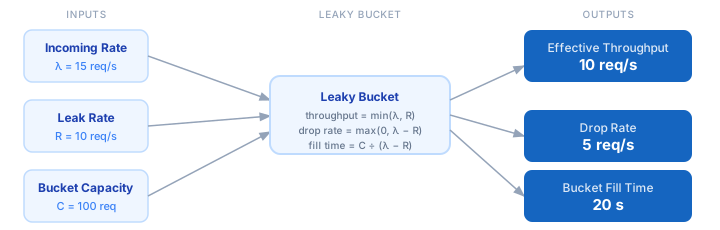
1. Enter your incoming request rate (λ) — how many requests arrive per second on average. 2. Set your leak rate (R) — how many requests the bucket allows through per second. 3. Enter the bucket capacity (C) — the maximum number of queued requests before dropping starts. 4. The calculator computes effective throughput = min(λ, R), the actual rate requests exit the bucket. 5. Drop rate = max(0, λ − R) shows how many requests per second are discarded when the bucket is full. 6. Bucket fill time = C ÷ (λ − R) tells you how many seconds until the bucket overflows (only applies when λ > R).
Formula
Effective Throughput = min(λ, R)
Drop Rate            = max(0, λ − R)
Bucket Fill Time     = C ÷ (λ − R)   [only when λ > R]

λ  — incoming request rate (requests per second)
R  — leak rate: requests allowed through per second
C  — bucket capacity: max queue depth before dropping
Bucket Fill Time is ∞ when λ ≤ R (bucket never fills)
Example Leaky Bucket Rate Calculations
Example 1 — Moderate overload (API gateway)
Incoming rate λ = 15 req/s
Leak rate     R = 10 req/s
Bucket capacity C = 100 requests

Effective throughput = min(15, 10) = 10 req/s
Drop rate            = 15 − 10    =  5 req/s
Bucket fill time     = 100 ÷ (15 − 10) = 20 seconds

→ 33 % of requests are dropped once the bucket overflows after 20 s
Example 2 — No overload (incoming ≤ leak rate)
Incoming rate λ =  8 req/s
Leak rate     R = 10 req/s
Bucket capacity C = 200 requests

Effective throughput = min(8, 10) =  8 req/s
Drop rate            = max(0, 8 − 10) = 0 req/s
Bucket fill time     = ∞ (bucket never overflows)

→ All 8 req/s pass through, bucket stays empty — no drops at all
Example 3 — Severe burst (DDoS / traffic spike)
Incoming rate λ = 500 req/s
Leak rate     R =  50 req/s
Bucket capacity C =  200 requests

Effective throughput = min(500, 50)  =  50 req/s
Drop rate            = 500 − 50      = 450 req/s
Bucket fill time     = 200 ÷ (500 − 50) = 0.44 seconds

→ 90 % of requests dropped; bucket overflows in under half a second
Tips for Tuning Leaky Bucket Rate Limits
- › Set your leak rate (R) to your backend's safe sustained capacity — not its peak capacity. The bucket gives you a burst buffer, not a sustained overload buffer.
- › Size the bucket capacity to absorb the longest expected burst without dropping. A short spike of 2× traffic for 5 seconds needs a bucket of at least 5 × (λ − R) requests.
- › Monitor drop rate in production. A non-zero drop rate under normal load means your leak rate is set too low. Use the <a href="/calculators/api-rate-limit-calculator">API Rate Limit Calculator</a> to cross-check your QPS headroom.
- › Prefer leaky bucket when you need smooth outbound traffic (e.g. calling a third-party API with strict per-second limits). Prefer token bucket when you want to allow short bursts — see the <a href="/calculators/token-bucket-rate-limit-calculator">Token Bucket Rate Limit Calculator</a>.
- › Combine leaky bucket with retry backoff on the client side. When the bucket drops a request, the client should wait before retrying — check the <a href="/calculators/retry-backoff-calculator">Retry Backoff Calculator</a> to size the delay.
- › In distributed systems, use a shared atomic counter (Redis INCR + TTL) to implement the leak rate across multiple nodes. Per-node leaky buckets can allow 2–5× your intended leak rate in a multi-instance deployment.
Notes
- › Results are estimates and may vary based on actual usage.
- › Always validate against your production environment.
Frequently Asked Questions
What is the leaky bucket algorithm? +
What is the difference between leaky bucket and token bucket? +
How do I choose the right bucket capacity? +
Does the leaky bucket algorithm prevent DDoS attacks? +
How is leaky bucket implemented in NGINX or AWS API Gateway? +
limit_req_zone and limit_req directives which implement a leaky bucket. Set rate=10r/s as the leak rate and burst=100 as the bucket capacity. AWS API Gateway's usage plans also implement leaky bucket semantics with "rate" (leak rate) and "burst" (bucket size) parameters. Both map directly to this calculator's inputs.