Lambda Cost Calculator
PerformanceEnter your Lambda function's memory, average duration, and monthly invocation count to get an instant cost breakdown. Works with AWS Lambda and any provider using GB-second billing.
Last updated: April 2026
This calculator is designed for real-world usage based on typical engineering scenarios and publicly available documentation.
The lambda cost calculator helps you estimate AWS Lambda charges before they appear on your bill. Lambda pricing has two components: a compute charge based on GB-seconds (memory × duration) and a flat per-request charge — and both compound quickly at scale. Engineers commonly underestimate Lambda costs because the GB-second unit is unintuitive. A 1 GB function running for 1 second costs $0.0000166667 in compute. Run it a million times and that's $16.67 — plus $0.20 in request charges. Double the memory allocation and costs double too, even if execution time halves. This calculator is useful when right-sizing memory, comparing cold-start trade-offs, budgeting a new event-driven architecture, or auditing an unexpectedly large cloud bill. It applies equally to AWS Lambda, Google Cloud Functions, and Azure Functions — just substitute the provider's GB-second and per-request rates. The AWS free tier covers 400,000 GB-seconds and 1 million requests per month. Adjust the rates to $0 to see your effective cost within the free tier window.
How to Calculate Lambda Cost
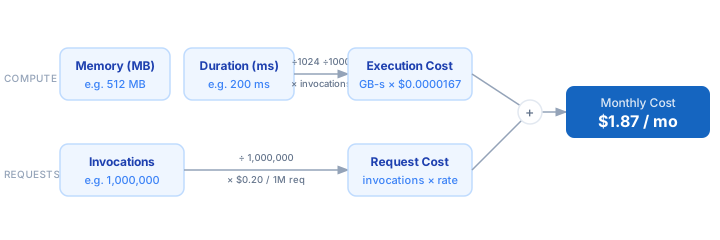
1. Measure or estimate your function's average execution duration in milliseconds using CloudWatch Logs or the Lambda console. 2. Note your configured memory allocation in MB — this also determines CPU proportionally. 3. Find your monthly invocation count from CloudWatch metrics or an APM tool. 4. Compute GB-seconds: (memory MB ÷ 1024) × (duration ms ÷ 1000) × invocations. 5. Multiply GB-seconds by the per-GB-second rate ($0.0000166667 for AWS) to get execution cost. 6. Add request cost: (invocations ÷ 1,000,000) × $0.20 for the total monthly charge.
Formula
GB-Seconds     = (Memory MB ÷ 1,024) × (Duration ms ÷ 1,000) × Invocations
Execution Cost = GB-Seconds × Price per GB-second
Request Cost   = (Invocations ÷ 1,000,000) × Price per 1M requests
Total Cost     = Execution Cost + Request Cost

Memory MB            — configured function memory (128–10,240 MB)
Duration ms          — average measured execution time in milliseconds
Invocations          — total monthly function invocations
Price per GB-second  — $0.0000166667 for AWS Lambda (us-east-1)
Price per 1M requests — $0.20 for AWS Lambda
Example Lambda Cost Calculations
Example 1 — Lightweight API handler (512 MB, 50 ms)
Memory:    512 MB  →  0.5 GB
Duration:   50 ms  →  0.050 s
Invocations: 5,000,000 / month

GB-seconds:  0.5 × 0.050 × 5,000,000  =  125,000
Execution:   125,000 × $0.0000166667  =  $2.0833
Requests:    5 × $0.20               =  $1.00
                                        ─────────────
Total: $3.08 / month
Example 2 — Image processing job (1024 MB, 800 ms)
Memory:   1,024 MB  →  1.0 GB
Duration:   800 ms  →  0.800 s
Invocations: 500,000 / month

GB-seconds:  1.0 × 0.800 × 500,000  =  400,000
Execution:   400,000 × $0.0000166667  =  $6.6667
Requests:    0.5 × $0.20             =  $0.10
                                        ─────────────
Total: $6.77 / month
Example 3 — ML inference function (3008 MB, 2000 ms)
Memory:   3,008 MB  →  2.9375 GB
Duration: 2,000 ms  →  2.000 s
Invocations: 100,000 / month

GB-seconds:  2.9375 × 2.000 × 100,000  =  587,500
Execution:   587,500 × $0.0000166667   =  $9.7917
Requests:    0.1 × $0.20               =  $0.02
                                        ─────────────
Total: $9.81 / month
AWS Lambda Pricing Reference
| Model | Input / 1M tokens | Output / 1M tokens |
|---|---|---|
| x86_64 Compute | $0.0000166667 / GB-s | — |
| arm64 Compute (Graviton) | $0.0000133334 / GB-s | — |
| Requests | $0.20 / 1M req | — |
| Free Tier (monthly) | 400,000 GB-s | — |
| Provisioned Concurrency | $0.0000097222 / GB-s | — |
Prices are approximate. Verify on your provider's pricing page before budgeting.
Tips to Reduce Lambda Costs
- › Switch to arm64 (Graviton2) architecture — it costs 20% less per GB-second with comparable throughput. A one-line change in your function configuration.
- › Right-size memory with AWS Lambda Power Tuning. The open-source Step Functions workflow runs your function at every memory tier and returns the cost-optimal setting automatically.
- › Reduce duration by warming up SDK clients and DB connections outside the handler. Connections initialised in the module scope persist across warm invocations and avoid re-initialisation cost.
- › Use the AWS Free Tier: 400,000 GB-seconds and 1 million requests per month never expire. For low-traffic functions, you may never pay anything at all.
- › Batch SQS, SNS, and Kinesis triggers to process multiple records per invocation instead of one. Fewer invocations means lower request charges at the same throughput.
- › Set reserved concurrency limits to cap runaway costs if a bug causes an unexpected invocation spike. Pair with CloudWatch billing alarms for early warning.
Notes
- › Results are estimates and may vary based on actual usage.
- › Always validate against your production environment.