Encryption Overhead Calculator
EncodingEnter your plaintext size and algorithm to instantly see ciphertext size, overhead bytes, and encryption time. Works for AES-128-GCM, AES-256-GCM, AES-256-CBC, and ChaCha20-Poly1305.
Last updated: April 2026
This calculator is designed for real-world usage based on typical engineering scenarios and publicly available documentation.
The encryption overhead calculator helps you estimate the exact byte overhead and latency cost of encrypting data with common symmetric algorithms. Developers working on secure APIs, file storage, and messaging systems need to know how much larger their ciphertext will be and how long encryption will take at production throughput. Every authenticated encryption scheme adds fixed metadata to each message: an initialization vector (or nonce) to ensure ciphertext uniqueness, plus an authentication tag to detect tampering. For AES-GCM and ChaCha20-Poly1305, this overhead is a constant 28 bytes per operation, regardless of plaintext size. AES-CBC uses a 16-byte IV and PKCS7 padding (up to 16 bytes), totalling 32 bytes of overhead per message. Size overhead matters most for small payloads. Encrypting a 64-byte IoT sensor reading with AES-256-GCM adds 44% to the message size. Encrypting a 10 MB video chunk adds just 0.0003%. Encryption time scales linearly with data size and inversely with CPU throughput — servers with AES-NI hardware acceleration (all modern x86/ARM chips) encrypt gigabytes per second, making latency negligible for most workloads. This calculator is useful when sizing storage quotas for encrypted blobs, estimating TLS record padding, evaluating algorithm choices for constrained devices, and modelling the throughput impact of end-to-end encryption in messaging or file sync pipelines.
How to Calculate Encryption Overhead
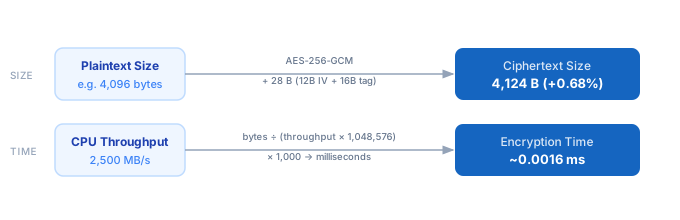
1. Choose your encryption algorithm — AES-128-GCM, AES-256-GCM, AES-256-CBC, or ChaCha20-Poly1305. Each has a fixed per-operation overhead in bytes. 2. Enter your plaintext size in bytes. This is the length of the data before encryption. 3. Enter your CPU throughput in MB/s. The default pre-fills based on the algorithm: AES-NI-accelerated AES-256-GCM typically runs at 2,000–3,000 MB/s; ChaCha20 at ~1,500 MB/s. 4. The calculator adds the algorithm's fixed overhead (IV + auth tag) to your plaintext size to get the ciphertext size. 5. Overhead percentage = overhead bytes ÷ plaintext bytes × 100. 6. Encryption time (ms) = plaintext bytes ÷ (throughput × 1,048,576) × 1,000.
Formula
Ciphertext Size  = Plaintext Size + Overhead Bytes
Overhead %       = (Overhead Bytes ÷ Plaintext Size) × 100
Encryption Time  = (Plaintext Size ÷ (Throughput × 1,048,576)) × 1,000

Plaintext Size   — bytes before encryption
Overhead Bytes   — AES-GCM / ChaCha20: 28 B (12B IV + 16B tag)
                   AES-CBC: 32 B (16B IV + up to 16B PKCS7 padding)
Throughput       — CPU encryption rate in MB/s (AES-NI: 2,000–4,000)
Encryption Time  — result in milliseconds
Example Encryption Overhead Calculations
Example 1 — 4 KB API payload with AES-256-GCM
Plaintext:     4,096 bytes
Algorithm:     AES-256-GCM — 12B nonce + 16B auth tag = 28 B overhead
Ciphertext:    4,096 + 28 = 4,124 bytes
Overhead %:    28 ÷ 4,096 × 100 = 0.68%
At 2,500 MB/s: 4,096 ÷ (2,500 × 1,048,576) × 1,000 = 0.0016 ms
─────────────────────────────────────────────────────
Conclusion: negligible size and time overhead for typical API payloads.
Example 2 — 128-byte IoT sensor reading with ChaCha20-Poly1305
Plaintext:     128 bytes
Algorithm:     ChaCha20-Poly1305 — 12B nonce + 16B tag = 28 B overhead
Ciphertext:    128 + 28 = 156 bytes
Overhead %:    28 ÷ 128 × 100 = 21.88%
At 1,500 MB/s: 128 ÷ (1,500 × 1,048,576) × 1,000 = 0.000081 ms
─────────────────────────────────────────────────────
Conclusion: size overhead is significant for tiny payloads — consider batching messages.
Example 3 — 10 MB video chunk with AES-256-CBC
Plaintext:     10,485,760 bytes (10 MB)
Algorithm:     AES-256-CBC — 16B IV + 16B PKCS7 padding = 32 B overhead
Ciphertext:    10,485,760 + 32 = 10,485,792 bytes
Overhead %:    32 ÷ 10,485,760 × 100 = 0.0003%
At 2,000 MB/s: 10,485,760 ÷ (2,000 × 1,048,576) × 1,000 = 5.00 ms
─────────────────────────────────────────────────────
Conclusion: size overhead is negligible for large payloads; encryption time is measurable.
Tips to Minimise Encryption Overhead
- › Prefer AES-256-GCM or ChaCha20-Poly1305 (AEAD modes) over AES-CBC — they authenticate and encrypt in one pass, eliminating the need for a separate HMAC and saving both bytes and CPU cycles.
- › Batch small messages before encrypting — for payloads under 100 bytes, the 28-byte overhead adds 28%+ to message size. Aggregating 10 messages into one reduces per-message overhead by 10×.
- › Verify AES-NI is enabled on your server — run <code>openssl speed -evp aes-256-gcm</code> to benchmark actual throughput. AES-NI delivers 2,000–4,000 MB/s; software-only AES is ~10× slower.
- › Reuse nonces carefully — AES-GCM nonces must be unique per key, not random, to avoid catastrophic security failures. Use a counter-based nonce scheme for high-throughput systems.
- › For TLS connections, encryption overhead per record is small, but the handshake is the dominant cost. Use the <a href="/calculators/tls-handshake-time-estimator">TLS Handshake Time Estimator</a> to model initial connection latency separately.
- › On ARM devices without AES-NI (many IoT chips), ChaCha20-Poly1305 is 2–5× faster than AES-GCM in software — it was designed for exactly this use case and has the same 28-byte overhead.
Notes
- › Results are estimates and may vary based on actual usage.
- › Always validate against your production environment.
Frequently Asked Questions
How many bytes does AES-256-GCM add to each message? +
What is the difference between AES-GCM and AES-CBC overhead? +
How do I measure actual encryption throughput on my server? +
openssl speed -evp aes-256-gcm on your target machine for AES-GCM throughput, or openssl speed -evp chacha20-poly1305 for ChaCha20. Results vary by CPU generation: Intel Ice Lake with AES-NI typically achieves 3,000–5,000 MB/s for AES-256-GCM. Always benchmark on production hardware since cloud VM performance varies significantly.