Base64 Size Calculator
EncodingEnter the original byte count to see the exact Base64-encoded size and overhead. Useful for JWT sizing, cookie limits, and inlined image planning.
Last updated: April 2026
This calculator is designed for real-world usage based on typical engineering scenarios and publicly available documentation.
Base64 encoding is everywhere — images embedded in JSON responses, binary files sent over email, JWT tokens, OAuth credentials in HTTP headers. But every time you Base64-encode data, it gets bigger. Predictably bigger: the encoded output is always approximately 33% larger than the original. This Base64 size calculator estimates the exact encoded size from your original byte count. Enter your original file or payload size in bytes and you'll immediately see the encoded size and the exact percentage overhead. This matters when you're deciding whether to inline an image as Base64 in a JSON API response, checking whether a JWT will exceed a cookie size limit, or calculating whether an email attachment will breach a server's maximum size. Use it to plan payload budgets for size-limited APIs, compare the trade-off between Base64 embedding vs. a URL reference, or verify a JWT or cookie won't hit browser limits.
How Base64 Encoding Increases Size
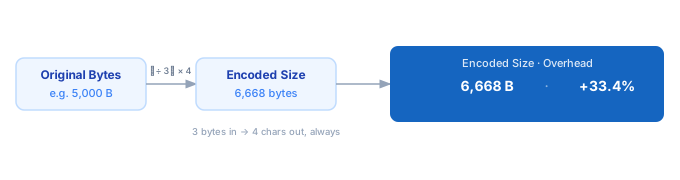
1. Enter the original size of your data in bytes. Use the <a href="/calculators/json-size-calculator">JSON Size Calculator</a> for JSON payloads, or check file properties for files. 2. The calculator applies the Base64 formula: every 3 input bytes become 4 output characters. 3. Padding is accounted for — if the byte count isn't divisible by 3, one or two '=' padding characters are appended. 4. Encoded size (bytes) and the percentage increase are shown instantly.
Formula
Encoded Size (bytes) = ⌈Original Bytes ÷ 3⌉ × 4
Percentage Increase  = ((Encoded − Original) ÷ Original) × 100

Why: Base64 maps every 3 bytes → 4 ASCII characters (6 bits × 4 chars = 24 bits = 3 bytes).
The ceiling ⌈⌉ handles padding for inputs not divisible by 3.
Example Base64 Size Calculations
Example 1 — Small image (5,000 bytes)
Original:  5,000 bytes
Encoded:   ⌈5,000 ÷ 3⌉ × 4 = 1,667 × 4 = 6,668 bytes
Overhead:  (6,668 − 5,000) ÷ 5,000 × 100 = 33.4%
Example 2 — 1 MB file
Original:  1,048,576 bytes (1 MB)
Encoded:   ⌈1,048,576 ÷ 3⌉ × 4 = 349,526 × 4 = 1,398,104 bytes ≈ 1.33 MB
Overhead:  33.3%  ← consistent regardless of file size
Example 3 — JWT token in a browser cookie
JWT payload: ~2,200 bytes
Base64url encoded: ⌈2,200 ÷ 3⌉ × 4 = 2,936 bytes
Cookie limit (most browsers): 4,096 bytes
Headroom remaining: 4,096 − 2,936 = 1,160 bytes — safe, but watch it.
Tips for Managing Base64 Size
- › Use a URL reference instead of inlining for images over ~10 KB. Base64-inlined images inflate HTML size, block parsing, and can't be cached separately by the browser.
- › Compress before encoding. Apply GZIP or Brotli to binary data before Base64-encoding it. Compression typically reduces size by 60–80%, partially offsetting the 33% Base64 overhead.
- › Check cookie size limits before using Base64-encoded JWTs. Most browsers cap cookies at 4,096 bytes. A 3,000-byte JWT becomes ~4,000 bytes encoded — barely under the limit.
- › Use Base64url for JWTs and URLs. It replaces + with - and / with _ to avoid URL encoding issues, with no change to the encoded byte count.
- › When building API payloads with Base64 content, verify the total JSON size with the <a href="/calculators/json-size-calculator">JSON Size Calculator</a> after embedding.
Notes
- › Results are estimates and may vary based on actual usage.
- › Always validate against your production environment.