JSON Size Calculator
Data & FormatsPaste any JSON to see its exact byte size and KB. Validates syntax in real time — no backend, no sign-up.
Last updated: April 2026
This calculator is designed for real-world usage based on typical engineering scenarios and publicly available documentation.
JSON payload size matters more than most developers realize. AWS API Gateway rejects payloads over 10 MB. Lambda has a 6 MB synchronous invocation limit. Mobile networks degrade when responses exceed a few KB. Knowing your JSON size before you deploy can prevent silent failures in production. This JSON size calculator shows the exact byte count and kilobyte size of any JSON string, using the same UTF-8 encoding your browser and server will use. Paste your payload and get an instant result — no backend, no guessing. It also validates JSON syntax on the fly, so malformed payloads are caught before they reach your API. Use it to verify a payload fits within an API's size limit, compare minified vs. pretty-printed JSON sizes, check whether a cached response is worth compressing, or debug unexpected 413 Payload Too Large errors.
How to Calculate JSON Payload Size
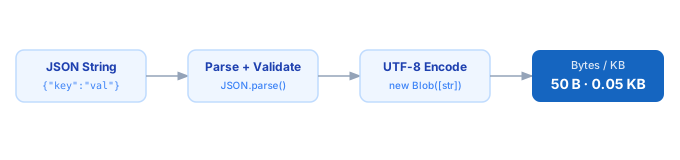
1. Paste your JSON into the input field. 2. The calculator runs JSON.parse to validate syntax — invalid JSON is flagged immediately. 3. It encodes the string as UTF-8 using the Blob API, which mirrors how browsers and servers measure payload size. 4. Size is displayed in bytes and kilobytes.
Formula
Size (bytes) = UTF-8 encoded byte length of the JSON string
Size (KB)    = Size (bytes) ÷ 1,024

Encoding rules:
- ASCII characters (a-z, 0-9, brackets, quotes) = 1 byte each
- Latin accented characters (é, ñ) = 2 bytes each
- CJK characters and emoji = 2–4 bytes each
Example JSON Size Calculations
Example 1 — Simple API response (all ASCII)
Input:   {"user":"alice","role":"admin","active":true}
Bytes:   50  (all ASCII — 1 byte per character)
KB:      50 ÷ 1,024 = 0.049 KB
Example 2 — Minified vs. pretty-printed comparison
Pretty:    {"user": "alice", "role": "admin"}  →  39 bytes
Minified:  {"user":"alice","role":"admin"}      →  33 bytes
Savings:   6 bytes (15%) — just by removing whitespace
Example 3 — Large paginated response (check against API limits)
Response with 100 records, ~800 bytes each:
Estimated size: 100 × 800 = 80,000 bytes = 78 KB

AWS API Gateway limit: 10 MB → safe
Cloudflare Worker limit: 100 MB → safe
Lambda sync limit: 6 MB → safe
Recommended max for mobile: ~200 KB → safe, but worth paginating
Tips to Reduce JSON Payload Size
- › Minify before sending. Remove all whitespace from JSON in production API responses — typically saves 15–30% with no information loss.
- › Shorten field names. Changing "description" to "desc" saves 8 bytes per occurrence. At 10,000 responses per day, that adds up.
- › Remove null and empty fields. Fields with null, empty string, or empty array values rarely need to be transmitted — omit them and document the absence convention.
- › Apply GZIP or Brotli compression. Most HTTP clients support it automatically. Compression typically reduces JSON by 60–80%, far outperforming any manual field trimming.
- › Paginate large arrays. Instead of returning 1,000 records in one response, return 50 per page. Smaller payloads parse faster and are easier to cache.
- › If you need to estimate Base64 overhead on a JSON payload, use the <a href="/calculators/base64-size-calculator">Base64 Size Calculator</a>.
Notes
- › Results are estimates and may vary based on actual usage.
- › Always validate against your production environment.
Frequently Asked Questions
Does whitespace affect JSON size? +
What encoding does this calculator use? +
Why do emoji and non-ASCII characters make JSON larger? +
What are common API payload size limits? +
How do I check the size of a JSON file rather than a string? +
wc -c filename.json in a terminal.