Download Speed Calculator
PerformanceEnter your file size and connection speed to instantly calculate how long a download will take. Works for any file type — software, video, backups, or datasets.
Last updated: April 2026
This calculator is designed for real-world usage based on typical engineering scenarios and publicly available documentation.
The download speed calculator converts file size and connection speed into a precise download time estimate — no guesswork required. Whether you're planning a large software deployment, estimating how long a video export will take to transfer, or sizing a backup window, this tool gives you an answer in seconds. Most confusion stems from the MB vs Mb distinction. File sizes are measured in Megabytes (MB); internet speeds are measured in Megabits per second (Mbps). Because one byte equals eight bits, a 100 Mbps connection can only transfer 12.5 MB per second — not 100 MB. This calculator handles the conversion automatically. Developers and DevOps teams use it to size CI/CD artifact downloads, pre-warm CDN edge caches, and set realistic timeout budgets for large file transfers. Network engineers use it during capacity planning to validate whether a link has enough headroom for peak transfer loads. For real-world accuracy, use your measured speed (not the advertised plan rate) from a tool like fast.com or speedtest.net. Overhead from TCP, TLS handshakes, and protocol headers typically reduces effective throughput by 5–15% on a good connection.
How to Calculate Download Time from Speed
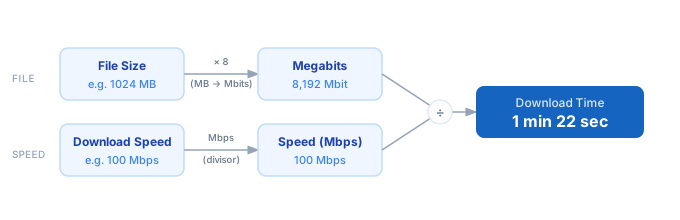
1. Measure your actual download speed in Megabits per second (Mbps) using fast.com or speedtest.net. 2. Find the file size in Megabytes (MB). Convert GB to MB by multiplying by 1024. 3. Convert the file size to Megabits: File Size MB × 8. 4. Divide total Megabits by your speed in Mbps to get seconds. 5. The calculator formats the result into milliseconds, seconds, minutes, or hours automatically.
Formula
Download Time (s) = (File Size in MB × 8) ÷ Speed in Mbps

File Size (MB)  — size of the file in Megabytes (1 GB = 1024 MB)
Speed (Mbps)    — connection speed in Megabits per second
× 8             — converts Megabytes to Megabits (1 byte = 8 bits)

Example: 1024 MB file at 100 Mbps
  = (1024 × 8) ÷ 100 = 8192 ÷ 100 = 81.9 seconds
Example Download Time Calculations
Example 1 — 1 GB software package on standard broadband (100 Mbps)
File Size:  1024 MB  ×  8  =  8,192 Megabits
Speed:      100 Mbps
                                  ─────────────
Time = 8,192 ÷ 100 = 81.9 seconds  →  ~1 min 22 sec
Example 2 — 4 GB Docker image on gigabit fibre (1000 Mbps)
File Size:  4096 MB  ×  8  =  32,768 Megabits
Speed:      1000 Mbps
                                   ─────────────
Time = 32,768 ÷ 1000 = 32.8 seconds
Example 3 — 500 MB dataset on slow office Wi-Fi (10 Mbps)
File Size:   500 MB  ×  8  =  4,000 Megabits
Speed:        10 Mbps
                                  ─────────────
Time = 4,000 ÷ 10 = 400 seconds  →  6 min 40 sec
Tips to Speed Up File Downloads
- › Always test your actual speed at fast.com before estimating — advertised plan speeds are maximums, not guarantees. Real-world throughput is typically 60–85% of the plan rate.
- › Use parallel chunk downloads for large files. Tools like aria2c and download managers split a file into segments fetched simultaneously, saturating your connection more efficiently than a single TCP stream.
- › For server-to-server transfers (e.g., S3 to EC2), stay in the same region. Cross-region bandwidth is slower and incurs egress costs. Use the <a href="/calculators/bandwidth-cost-calculator">Bandwidth Cost Calculator</a> to estimate charges.
- › Compress files before transfer. A 2:1 compression ratio halves your download time for text-heavy payloads like JSON, logs, or source archives. Use the <a href="/calculators/compression-ratio-calculator">Compression Ratio Calculator</a> to model savings.
- › Schedule large downloads during off-peak hours (late night). Shared connections — office Wi-Fi, ISP networks — experience less congestion and can reach closer to peak speed.
- › Set realistic timeouts in your application. If a 500 MB download takes 400 seconds on a 10 Mbps link, a 30-second HTTP timeout will always fail. Use the <a href="/calculators/timeout-calculator">Timeout Calculator</a> to size your timeout budgets.
Notes
- › Results are estimates and may vary based on actual usage.
- › Always validate against your production environment.