Disk IOPS Calculator
GeneralCalculate disk IOPS from seek time, RPM, block size, and transfer rate. Works for HDDs, SSDs, and NVMe drives — enter your drive specs and get an instant result.
Last updated: April 2026
This calculator is designed for real-world usage based on typical engineering scenarios and publicly available documentation.
A disk IOPS calculator helps you estimate how many input/output operations per second your storage can sustain before becoming a bottleneck. IOPS is the single most important metric for random-access workloads — databases, virtual machines, and transaction logs all depend on it. Knowing your drive's IOPS ceiling lets you right-size storage before deploying to production. Storage engineers, DBAs, and DevOps teams use this calculation to compare drive tiers, validate cloud storage choices, and size RAID arrays. Hard drives are limited by mechanical movement — seek time and rotational latency dominate IO time — while SSDs eliminate rotation entirely, pushing IOPS into the tens of thousands. NVMe drives remove the SATA bottleneck too, with IOPS exceeding one million on high-end models. The formula above calculates maximum theoretical IOPS for random 4K reads. Real-world IOPS will vary with queue depth, filesystem overhead, and mixed read/write ratios, but this figure gives you a useful upper bound for capacity planning and drive comparisons. To model the cost of storing data on cloud storage tiers alongside this performance estimate, use the Storage Cost Calculator.
How to Calculate Disk IOPS
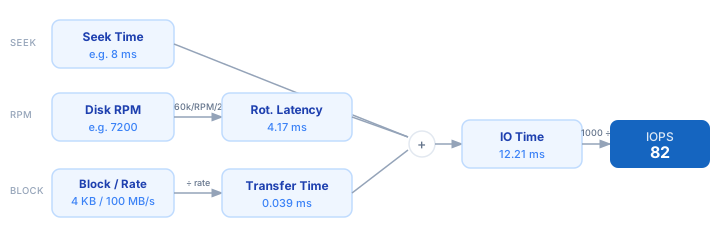
1. Enter seek time — the time in milliseconds for the disk head to move to the correct track. Typical HDDs: 8–12 ms. SSDs: 0.05–0.1 ms. 2. Enter disk RPM — used to derive rotational latency. Common values: 5400, 7200, 10000, 15000. Enter 0 for SSDs (no rotation). 3. Enter block size in KB — the granularity of each IO operation. Use 4 KB for database workloads, 64–512 KB for large sequential reads. 4. Enter transfer rate in MB/s — your drive's sequential transfer speed, found on the spec sheet or measured with a benchmark tool. 5. The calculator derives: Rotational Latency = (60,000 / RPM) / 2; Transfer Time = (Block KB / 1024) / Rate × 1000; IO Time = Seek + Rot. Latency + Transfer Time; IOPS = 1000 / IO Time.
Formula
IOPS = 1000 / IO Time

IO Time (ms)            = Seek Time + Rotational Latency + Transfer Time
Rotational Latency (ms) = (60,000 / RPM) / 2
Transfer Time (ms)      = (Block Size KB / 1024) / Transfer Rate MB/s × 1000

Seek Time       — time to position the read/write head over the correct track (ms)
Rotational Latency — average time to wait for the sector to rotate under the head (ms)
Transfer Time   — time to read the data block once positioned (ms)
IO Time         — total elapsed time per IO operation (ms)
IOPS            — maximum random IO operations per second
Example Disk IOPS Calculations
Example 1 — 7200 RPM HDD (typical desktop / NAS drive)
Seek Time:         8.00 ms
Rot. Latency:      60,000 / 7200 / 2  =  4.17 ms
Transfer Time:     (4 KB / 1024) / 100 MB/s × 1000  =  0.039 ms
                                                         ──────────────
IO Time:           8.00 + 4.17 + 0.039  =  12.21 ms
IOPS:              1000 / 12.21  ≈  82 IOPS
Example 2 — Consumer SATA SSD (e.g. Samsung 870 EVO)
Seek Time:         0.10 ms
Rot. Latency:      0 ms  (no rotating platter)
Transfer Time:     (4 KB / 1024) / 550 MB/s × 1000  =  0.007 ms
                                                         ──────────────
IO Time:           0.10 + 0 + 0.007  =  0.107 ms
IOPS:              1000 / 0.107  ≈  9,346 IOPS
Example 3 — 15,000 RPM Enterprise SAS Drive
Seek Time:         3.50 ms
Rot. Latency:      60,000 / 15,000 / 2  =  2.00 ms
Transfer Time:     (4 KB / 1024) / 200 MB/s × 1000  =  0.020 ms
                                                         ──────────────
IO Time:           3.50 + 2.00 + 0.020  =  5.52 ms
IOPS:              1000 / 5.52  ≈  181 IOPS
Tips to Maximise Disk IOPS
- › Use SSDs for any random-access workload. A mid-range SATA SSD delivers 50–100× more IOPS than a 7200 RPM HDD at the same cost per GB in 2025.
- › Prefer NVMe over SATA for latency-sensitive workloads. NVMe eliminates the SATA controller bottleneck, pushing random IOPS above 500k on consumer drives and beyond 1M on enterprise NVMe.
- › Keep block size at 4 KB for databases (PostgreSQL, MySQL, MongoDB). Larger blocks increase transfer time per IO and reduce effective random IOPS at the application level.
- › RAID-0 striping multiplies IOPS linearly — two identical drives in a stripe set roughly double IOPS. RAID-10 gives you the same benefit with redundancy. RAID-5/6 can hurt random write IOPS due to parity overhead.
- › Monitor IO queue depth. HDDs saturate at queue depth 1–4; enterprise SSDs sustain high IOPS up to queue depth 32+. If your application issues bursts of parallel IOs, check that the queue is deep enough to keep the drive busy.
- › For cloud VMs, provisioned IOPS storage (AWS io2, GCP Extreme PD) lets you dial in the exact IOPS you calculated and avoid noisy-neighbour throttling on gp2/pd-balanced tiers.
Notes
- › Results are estimates and may vary based on actual usage.
- › Always validate against your production environment.
Frequently Asked Questions
What is IOPS and why does it matter? +
How many IOPS does a 7200 RPM HDD deliver? +
How many IOPS does an NVMe SSD achieve? +
What is the difference between sequential and random IOPS? +
How do I measure actual IOPS on Linux? +
fio — the standard storage benchmark: fio --name=randread --ioengine=libaio --rw=randread --bs=4k --numjobs=4 --iodepth=32 --runtime=30 --filename=/dev/sdb. For a quick live view of current IOPS, run iostat -x 1 and read the r/s and w/s columns. Always benchmark at the block size your application actually uses for an accurate comparison.