Cron Next Run Calculator
API & BackendInstantly calculate the next run times for any cron expression. Paste your schedule, set a start time, and see exactly when your cron job will fire.
Last updated: April 2026
This calculator is designed for real-world usage based on typical engineering scenarios and publicly available documentation.
A cron next run calculator helps developers and DevOps engineers predict when scheduled jobs will execute without deploying code or waiting for the event to fire. Cron expressions follow a five-field syntax covering minute, hour, day-of-month, month, and day-of-week — and small mistakes can shift execution by hours, days, or weeks. Engineers typically reach for a cron next run tool when debugging a silent job failure (the schedule is technically valid but fires at an unexpected time), planning maintenance windows (verifying that batch jobs won't overlap), or writing infrastructure-as-code (confirming a Kubernetes CronJob or AWS EventBridge schedule runs at the right frequency before deploying). This calculator supports the standard five-field POSIX cron syntax used by Linux crontab, GitHub Actions scheduled workflows, Kubernetes CronJobs, AWS EventBridge Scheduler, and GCP Cloud Scheduler. Step values (*/5), ranges (1-5), lists (1,3,5), and wildcards (*) are all supported. Results are shown in your browser's local timezone using your device clock.
How to Calculate the Next Cron Job Run Time
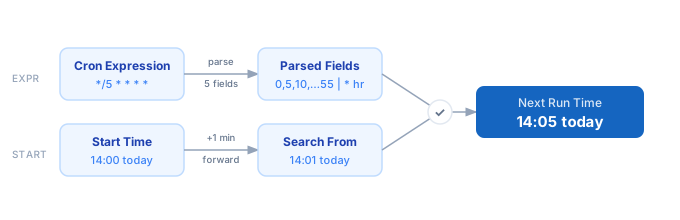
1. Enter your five-field cron expression in the format: minute hour day-of-month month day-of-week. 2. Set the start time — defaults to now, but shift it forward to inspect future scheduling windows. 3. Set how many next runs you want to see (1–10). 4. The calculator steps forward minute by minute from your start time, checking whether each timestamp matches all five fields. 5. The first N matching timestamps are displayed in chronological order, with the nearest run highlighted.
Formula
Next Run = first datetime ≥ Start + 1 min where all 5 fields match

Field 1 — Minute    (0–59):  when in the hour to fire
Field 2 — Hour      (0–23):  which hour(s) of the day
Field 3 — Day-Month (1–31):  which day(s) of the month
Field 4 — Month     (1–12):  which month(s) of the year
Field 5 — Day-Week  (0–6):   day of the week (0 = Sunday)

Special syntax:
  *      every value in the field's range
  */n    every n-th value (step)
  a-b    inclusive range
  a,b,c  explicit comma-separated list
Example Cron Next Run Calculations
Example 1 — Every 5 minutes (*/5 * * * *)
Expression:  */5 * * * *
Start time:  2026-04-14 14:00

Next runs:
  ▶  Tue 2026-04-14 14:05
     Tue 2026-04-14 14:10
     Tue 2026-04-14 14:15
     Tue 2026-04-14 14:20
     Tue 2026-04-14 14:25

The minute field */5 expands to 0,5,10,15,20,25,30,35,40,45,50,55.
Example 2 — Weekdays at 9:00 AM (0 9 * * 1-5)
Expression:  0 9 * * 1-5
Start time:  2026-04-14 08:50 (Tuesday)

Next runs:
  ▶  Tue 2026-04-14 09:00
     Wed 2026-04-15 09:00
     Thu 2026-04-16 09:00
     Fri 2026-04-17 09:00
     Mon 2026-04-20 09:00

Day-of-week 1-5 expands to Monday through Friday, skipping Saturday (6) and Sunday (0).
Example 3 — Monthly job on the 1st at 2:30 AM (30 2 1 * *)
Expression:  30 2 1 * *
Start time:  2026-04-02 00:00

Next runs:
  ▶  Fri 2026-05-01 02:30
     Mon 2026-06-01 02:30
     Wed 2026-07-01 02:30

The dom field "1" fires only on the 1st of each month. The calculator jumps ~30 days between matches, confirming the schedule is truly monthly.
Tips for Writing Better Cron Expressions
- › Always verify a new expression in this calculator before deploying. `0 8 * * 1-5` (weekdays at 8am) vs `0 8 1-5 * *` (first 5 days of month at 8am) are easy to confuse.
- › Stagger workers with offsets to spread load: use `1-59/5`, `2-59/5`, `3-59/5`, etc. instead of `*/5` when running multiple concurrent cron workers.
- › Kubernetes CronJobs, GitHub Actions, and AWS EventBridge all run in UTC. Set this calculator's start time to your UTC equivalent to verify behavior from the server's perspective.
- › Avoid `* * * * *` (every minute) for jobs that can exceed 60 seconds. Concurrent instances pile up silently. Use a queue with a single consumer instead.
- › For quarterly jobs, use a list in the month field: `0 4 1 1,4,7,10 *` fires at 4am on the 1st of January, April, July, and October. Enter it above to see all four dates at once.
- › Use named weekday ranges (`1-5` for Mon–Fri) instead of day-of-month values for business-day schedules — it handles month-boundary edge cases automatically.
Notes
- › Results are estimates and may vary based on actual usage.
- › Always validate against your production environment.
Frequently Asked Questions
What is a cron expression? +
*), step values (*/5), ranges (1-5), and lists (1,3,5) to express complex recurring schedules in a compact format. How do I run a cron job every 5 minutes? +
*/5 * * * *. The */5 in the minute field means "every 5th minute starting from 0": 0, 5, 10, 15 … 55. For every 10 minutes use */10 * * * *, for every 15 minutes use */15 * * * *, and for every 30 minutes use */30 * * * *. Enter any of these in the calculator above to confirm the exact next fire times. What does */ mean in a cron expression? +
*/n syntax means "every n-th value" across the field's full range. In the minute field (0–59), */5 expands to 0, 5, 10 … 55. In the hour field (0–23), */6 means midnight, 6am, noon, and 6pm. You can also scope it: 10-50/10 steps from 10 to 50 in increments of 10, yielding 10, 20, 30, 40, 50. Why is my cron job not running when I expect? +
What is the minimum cron interval? +
* * * * * if you need to run every single minute. For rate-limit and throughput planning alongside your schedule, see the API Rate Limit Calculator.