Cache TTL Impact Calculator
PerformanceEstimate cache hit rate, origin request reduction, and monthly bandwidth savings based on TTL, request rate, and unique object count. Adjust the inputs to tune your CDN or application cache for optimal performance.
Last updated: April 2026
This calculator is designed for real-world usage based on typical engineering scenarios and publicly available documentation.
The cache TTL impact calculator helps engineers quantify what a given Time-to-Live value actually does to your infrastructure. TTL is the single most influential cache knob — too short and you flood your origin with unnecessary requests; too long and users see stale data. This calculator makes the tradeoff visible with real numbers. The core model is straightforward: every unique cache key needs to be refreshed once per TTL window. Divide your unique object count by the TTL in seconds and you get the minimum number of origin requests per second — your irreducible miss floor. Every request above that floor is served from cache without touching origin. This calculator is useful for capacity planning, cost estimation, and TTL tuning. API engineers use it to set sensible Cache-Control headers. Platform engineers use it to size origin capacity when a CDN sits in front of a service. SREs use it to model the blast radius of a cache flush — resetting TTLs to zero temporarily is effectively a denial-of-service on your own origin, and knowing the hit rate tells you exactly how much origin headroom you need. Bandwidth savings are calculated by multiplying cache hits per second by the response size and by the number of seconds per month (2,592,000), then pricing it at your per-GB egress rate. AWS CloudFront charges approximately $0.085/GB for the first 10 TB. Cloudflare CDN does not charge for bandwidth served from cache, so savings on Cloudflare show up as origin offload rather than direct cost reduction.
How to Calculate Cache TTL Impact
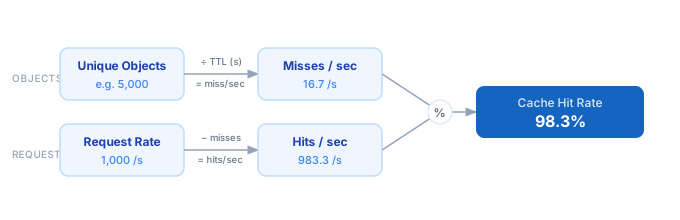
1. Enter your total request rate — the number of HTTP requests per second hitting the cache layer (from your CDN dashboard or APM tool). 2. Enter the number of unique cache keys in your working set — distinct URLs or object identifiers that the cache must store. 3. Enter the TTL in seconds. Convert minutes (5 min = 300 s) or hours (1 hr = 3600 s) before entering. 4. The calculator divides unique objects by TTL to find misses per second — this is the minimum origin load regardless of total traffic volume. 5. Cache hit rate = (request rate − misses per second) ÷ request rate, expressed as a percentage. 6. Bandwidth savings and average latency saved are derived from the hit rate, your response size, and origin response time.
Formula
Miss Rate   = min(1,  Unique_Objects / (Request_Rate × TTL))
Hit Rate    = 1 − Miss Rate

Misses/sec  = Request_Rate × Miss Rate
Hits/sec    = Request_Rate × Hit Rate

Avg Latency Saved    = Hit_Rate × Origin_Response_Time
Monthly BW Saved(GB) = Hits/sec × 2,592,000 × Response_Size(KB) / 1,048,576
Monthly BW Cost($)   = Monthly_BW_Saved_GB × Bandwidth_Cost_per_GB

Request_Rate         — total requests per second hitting the cache layer
Unique_Objects       — number of distinct cache keys in your working set
TTL                  — cache Time-to-Live in seconds
Origin_Response_Time — round-trip time to origin in milliseconds
Response_Size        — average cached response size in kilobytes
Bandwidth_Cost       — egress cost per GB (e.g. $0.085 for AWS CloudFront)
Example Cache TTL Impact Calculations
Example 1 — Small REST API with 5-minute TTL
Request Rate: 100 req/s  |  Unique Objects: 1,000  |  TTL: 300 s
Origin RT: 150 ms  |  Response Size: 10 KB  |  BW Cost: $0.085/GB

Misses/sec  = 1,000 / 300                     =   3.3 /s
Hit Rate    = (100 − 3.3) / 100               =  96.7%
Hits/sec    = 96.7 /s

Avg Latency Saved  = 0.967 × 150              = 145 ms
Monthly BW Saved   = 96.7 × 2,592,000 × 10 / 1,048,576  =  2,389 GB
Monthly Savings    = 2,389 × $0.085           = $203/month
Example 2 — E-commerce CDN with 1-hour TTL
Request Rate: 5,000 req/s  |  Unique Objects: 50,000  |  TTL: 3,600 s
Origin RT: 300 ms  |  Response Size: 100 KB  |  BW Cost: $0.085/GB

Misses/sec  = 50,000 / 3,600                  =  13.9 /s
Hit Rate    = (5,000 − 13.9) / 5,000          =  99.7%
Hits/sec    = 4,986 /s

Avg Latency Saved  = 0.997 × 300              = 299 ms
Monthly BW Saved   = 4,986 × 2,592,000 × 100 / 1,048,576  = 1,232,015 GB
Monthly Savings    = 1,232,015 × $0.085       = $104,721/month
Example 3 — TTL tradeoff: 30 s vs 300 s
Request Rate: 1,000 req/s  |  Unique Objects: 10,000  |  Response Size: 20 KB

With TTL = 30 s (very short):
  Misses/sec  = 10,000 / 30   =  333.3 /s
  Hit Rate    = (1,000 − 333.3) / 1,000  =  66.7%
  Origin load = 333.3 req/s

With TTL = 300 s (10× longer):
  Misses/sec  = 10,000 / 300  =   33.3 /s
  Hit Rate    = (1,000 − 33.3) / 1,000   =  96.7%
  Origin load =  33.3 req/s

→ 10× increase in TTL → 10× reduction in origin hit count → 30% increase in hit rate
Tips to Optimize Cache TTL
- › Set TTL proportional to content change frequency — static assets like JS bundles can safely use year-long TTLs with cache-busting via filename hashing, while mutable API responses should stay under 60 seconds.
- › Use <code>stale-while-revalidate</code> in Cache-Control headers. This serves the cached version instantly while refreshing in the background, eliminating the latency penalty on cache misses without reducing TTL.
- › Segment TTLs by content type. A product catalog changes hourly; a user profile changes in minutes; a static banner changes daily. Match TTL to volatility rather than using one global default across all routes.
- › Monitor your cache hit ratio in production — most CDNs expose it as a dashboard metric. A ratio below 80% usually signals that TTL is too short, your unique object count exceeds cache capacity, or the cache key includes unbounded dynamic query parameters.
- › Warm the cache on deployment by pre-populating popular keys immediately after a release. A cold cache after a deploy causes a traffic spike on origin proportional to your miss rate — knowing that rate in advance lets you provision extra capacity.
- › Combine a short TTL with ETags or Last-Modified headers. Clients revalidate on expiry with a conditional GET — if content is unchanged, origin returns 304 Not Modified with no body, saving most bandwidth even on technically stale entries.
Notes
- › Results are estimates and may vary based on actual usage.
- › Always validate against your production environment.