Log Storage Cost Calculator
PerformanceEnter your daily log volume, retention window, and compression ratio to get an instant monthly storage cost estimate. Works with S3, GCS, Azure Blob, Elasticsearch, and any GB-priced store.
Last updated: April 2026
This calculator is designed for real-world usage based on typical engineering scenarios and publicly available documentation.
The log storage cost calculator helps you model the real price of retaining application logs before your bill arrives. Log data compounds quickly — a modest 10 GB/day pipeline becomes 300 GB of raw storage after 30 days, and most teams run multiple services at far higher volumes. Who uses this? Platform engineers sizing object storage for a centralised log aggregation pipeline, SREs deciding whether a 90-day retention policy is affordable, and FinOps practitioners auditing why the observability budget keeps ballooning. Plugging in your actual numbers takes 30 seconds and often surfaces surprising savings opportunities. Compression is the single biggest lever in this formula. Structured JSON logs typically compress 5:1 to 10:1 with gzip or zstd, meaning a 300 GB raw footprint can shrink to 30–60 GB. The calculator lets you model both the raw and compressed size side by side so the impact is immediately visible. Storage pricing varies by provider and tier: AWS S3 Standard charges ~$0.023/GB/month, S3 Infrequent Access ~$0.0125/GB/month, and GCS Nearline ~$0.010/GB/month. Use the price field to compare tiers or providers without leaving the page.
How to Calculate Log Storage Cost
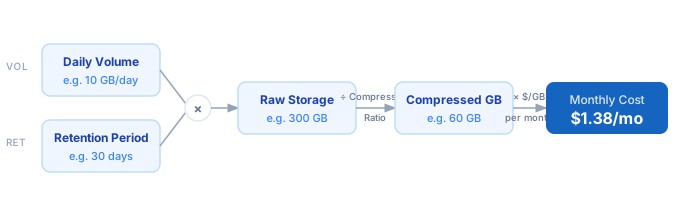
1. Measure your daily ingestion volume in GB. Check your log shipper metrics, S3 PUT bytes, or CloudWatch Logs ingestion stats. 2. Set the retention period — how many days of logs you need to keep online for search or compliance. 3. Multiply: Raw Storage (GB) = Daily Volume × Retention Days. 4. Divide raw storage by your compression ratio to get the on-disk footprint. Structured JSON typically compresses 5:1 to 10:1 with gzip. 5. Multiply compressed storage by your provider's per-GB/month price to get the monthly cost.
Formula
Monthly Cost = (Daily Volume × Retention Days ÷ Compression Ratio) × $/GB/month

Daily Volume     — uncompressed log bytes ingested per day (GB)
Retention Days   — how long logs are kept (e.g. 30, 90, 365)
Compression Ratio — gzip/zstd ratio; use 5 for typical JSON logs, 10 for verbose text
$/GB/month       — storage unit price (S3 Standard ≈ $0.023, GCS Nearline ≈ $0.010)
Example Log Storage Cost Calculations
Example 1 — Small SaaS app on S3 Standard (30-day retention)
Daily volume:   5 GB/day  ×  30 days  =  150 GB raw
Compression:    150 GB  ÷  5:1  =  30 GB on disk
Storage price:  30 GB  ×  $0.023/GB/mo  =  $0.69/month
────────────────────────────────────────────────────
Annual cost:  ~$8.28   (negligible — retention is the right concern here)
Example 2 — High-traffic microservices on S3 Standard (90-day retention)
Daily volume:   50 GB/day  ×  90 days  =  4,500 GB raw
Compression:    4,500 GB  ÷  8:1  =  562.5 GB on disk
Storage price:  562.5 GB  ×  $0.023/GB/mo  =  $12.94/month
────────────────────────────────────────────────────
Switch to S3 IA ($0.0125): $7.03/month  →  saves ~$70/year
Example 3 — Enterprise compliance logging on GCS Nearline (365-day retention)
Daily volume:   200 GB/day  ×  365 days  =  73,000 GB raw
Compression:    73,000 GB  ÷  6:1  =  12,167 GB on disk
Storage price:  12,167 GB  ×  $0.010/GB/mo  =  $121.67/month
────────────────────────────────────────────────────
Annual cost:  ~$1,460   (segment cold vs. hot logs to cut this further)
Log Storage Pricing by Provider
| Model | Input / 1M tokens | Output / 1M tokens |
|---|---|---|
| AWS CloudWatch Logs | $0.03/GB/mo | $0.50/GB |
| AWS S3 Standard (log archive) | $0.023/GB/mo | $0.00/GB |
| AWS S3 Infrequent Access | $0.0125/GB/mo | $0.00/GB |
| AWS S3 Glacier Instant | $0.004/GB/mo | $0.00/GB |
| Google Cloud Logging | $0.01/GB/mo | $0.50/GB |
| Google Cloud Storage Nearline | $0.010/GB/mo | $0.00/GB |
| Azure Monitor Logs | $0.12/GB/mo | $2.30/GB |
| Datadog Log Management | $0.10/GB/mo | $0.10/GB |
| Grafana Cloud Logs | $0.50/GB/mo | $0.50/GB |
| Elastic Cloud (Elasticsearch) | $0.032/GB/mo | N/A |
Prices are approximate. Verify on your provider's pricing page before budgeting.
Tips to Reduce Log Storage Cost
- › Use S3 Intelligent-Tiering or lifecycle rules to move logs older than 30 days to Infrequent Access automatically — typically cuts storage cost by 45% with no code changes.
- › Apply structured logging (JSON) from day one. Structured logs compress 5–10× better than plaintext stack traces, and they also enable cheaper columnar storage formats like Parquet if you archive to a data lake.
- › Sample debug and trace logs aggressively in production — keep 1–5% of TRACE-level events rather than 100%. ERROR and WARN logs should remain at 100% to preserve signal for incident investigation.
- › Benchmark your compression ratio with real production logs before budgeting. Run <code>gzip -9 sample.log && ls -lh sample.log.gz</code> to get an accurate figure instead of guessing.
- › Set per-service retention policies rather than a blanket window. Auth and payment logs may need 1 year for compliance; ephemeral worker logs rarely need more than 7 days.
- › Archive cold logs to Glacier or GCS Archive ($0.004/GB/month) for compliance retention — it is 6× cheaper than Nearline and still meets most regulatory retrieval SLAs.
Notes
- › Results are estimates and may vary based on actual usage.
- › Always validate against your production environment.
Frequently Asked Questions
How do I measure my current daily log volume? +
What compression ratio should I use for JSON application logs? +
gzip -9 on a representative 100 MB sample and measure the output size for the most accurate ratio for your workload.